URS-061 · LOT policy defined per product with dropdown
Title: LOT policy defined per product with dropdown Date: 2026-09-29T02:30:51.729Z Duration: 121.7s Overall Status: ✅ PASS
User Requirement
Section titled “User Requirement”The system shall support product‑specific LOT selection in accordance with defined LOT policies.
Source: User_Requirement_Specifications_Vantis_DeviceFlow.xlsx — the run below proves the system meets this requirement.
Environment
Section titled “Environment”- Inbox URL: http://localhost:39805
- Database: localhost:36443/cc_repinbox_dev
Status: ✅ PASS
Test Steps
Section titled “Test Steps”Each step below corresponds to one Playwright test that ran sequentially. Screenshots and video recordings provide visual evidence of the UI behaviour.
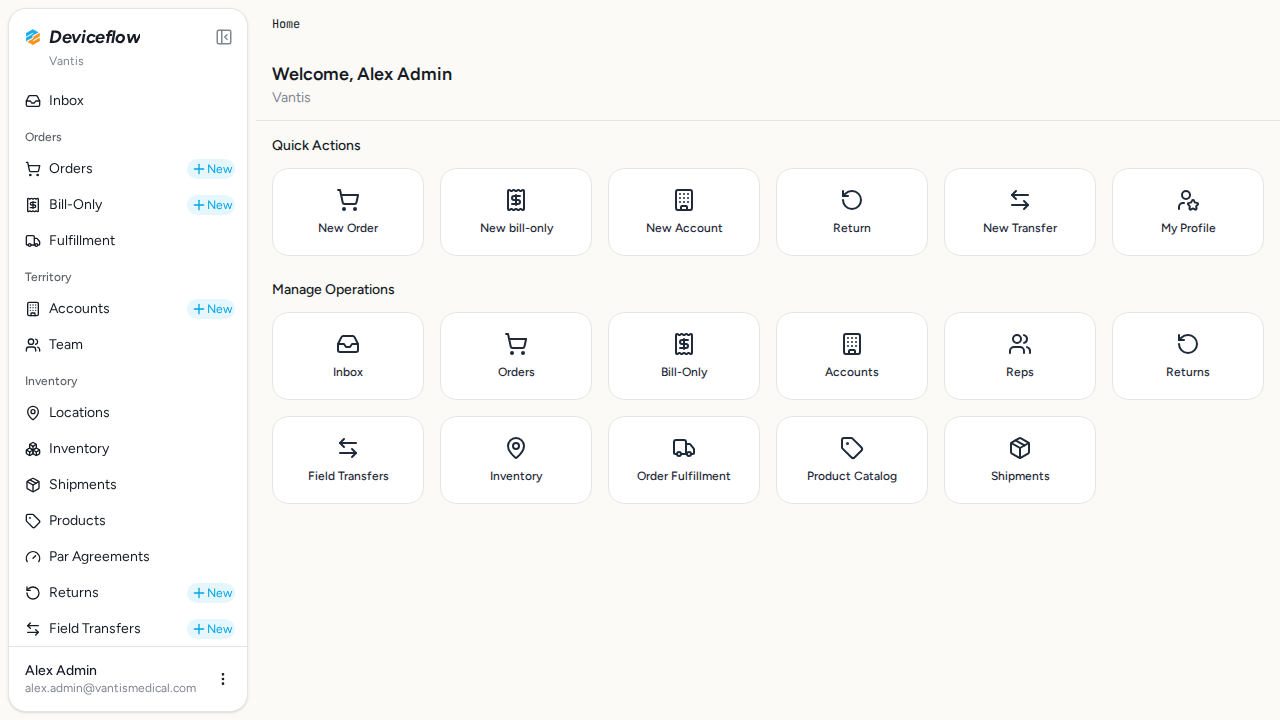
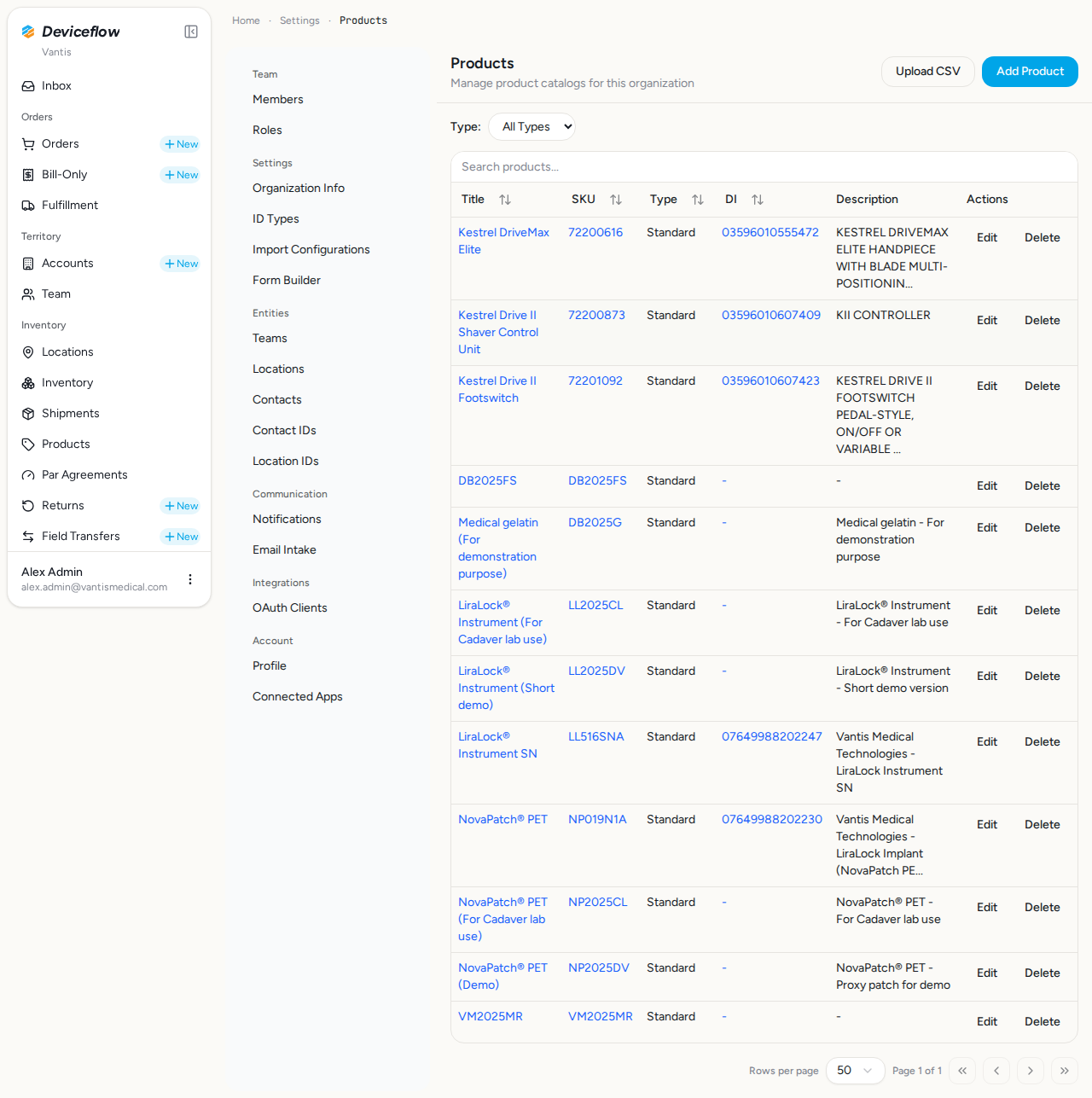
1. Step 1: Open Products list — ✅ PASS
Section titled “1. Step 1: Open Products list — ✅ PASS”What this step proves:
A Vantis admin logs in and opens the Products settings page. This confirms that the product management interface is accessible and that the products list renders for an admin user.
Screenshots:
Video recording:
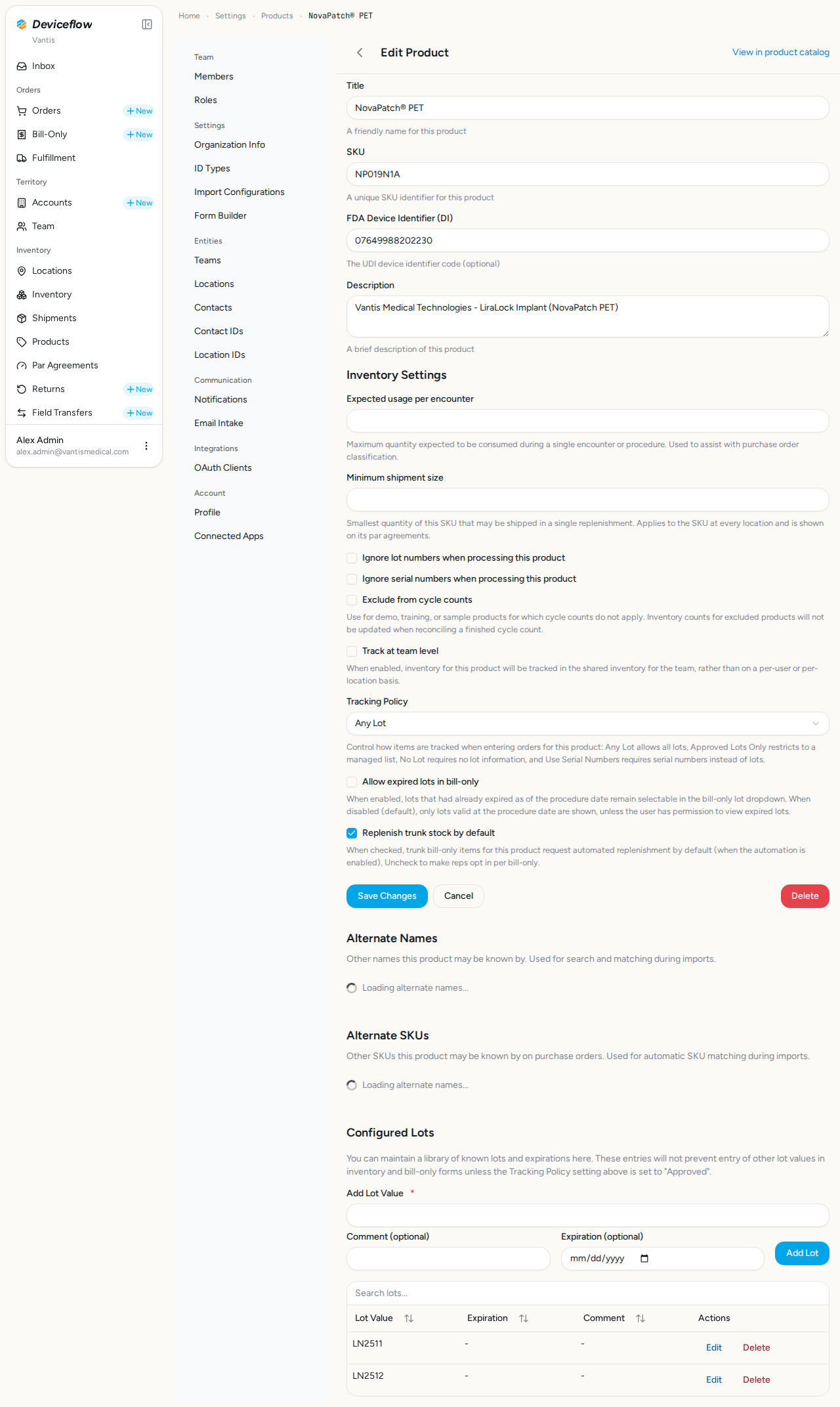
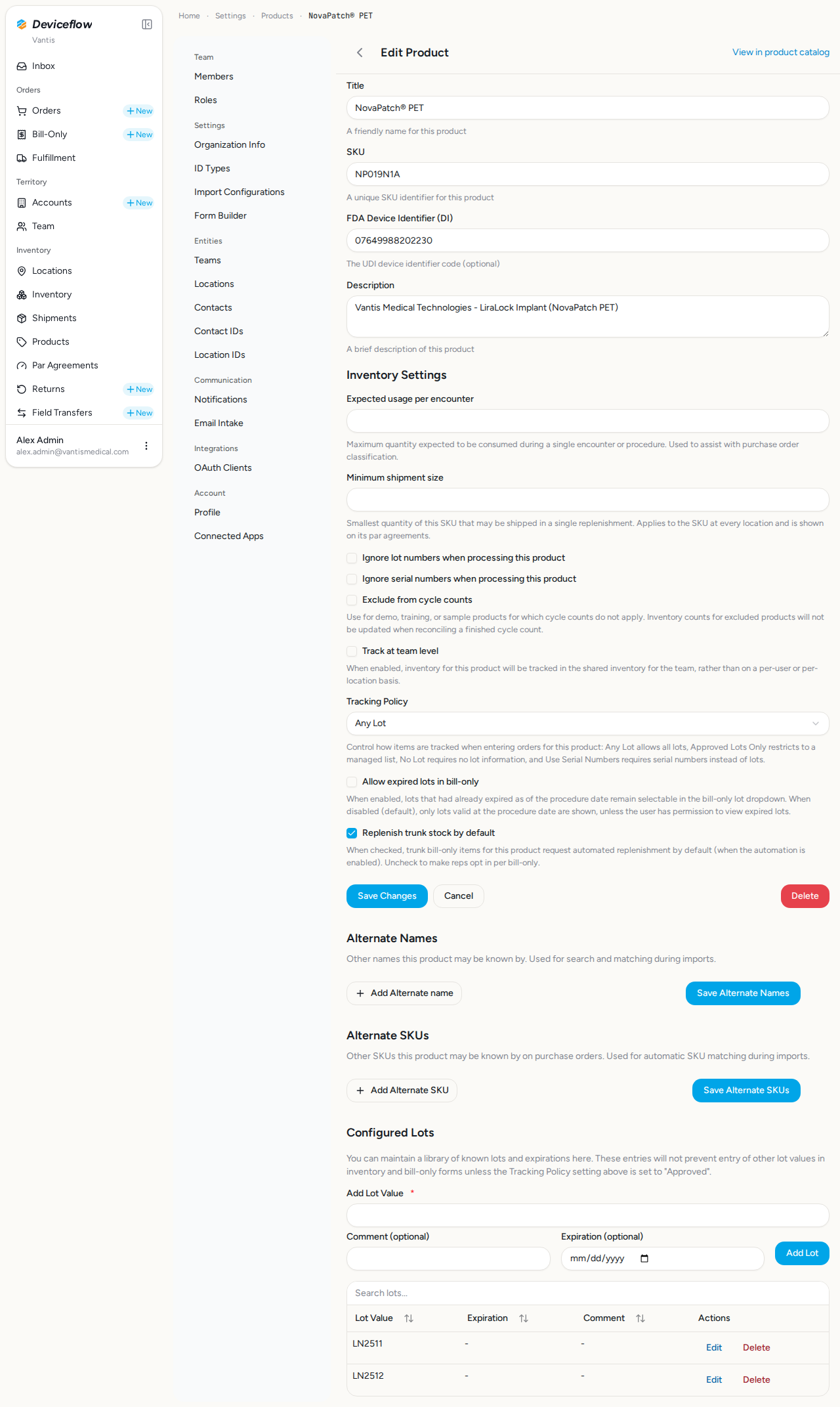
2. Step 2: Open Product A — ✅ PASS
Section titled “2. Step 2: Open Product A — ✅ PASS”What this step proves:
The admin navigates to the NovaPatch product settings page and confirms the Tracking Policy field is visible and set to “Any Lot” by default. This establishes the initial state before any policy change.
Screenshots:
Video recording:
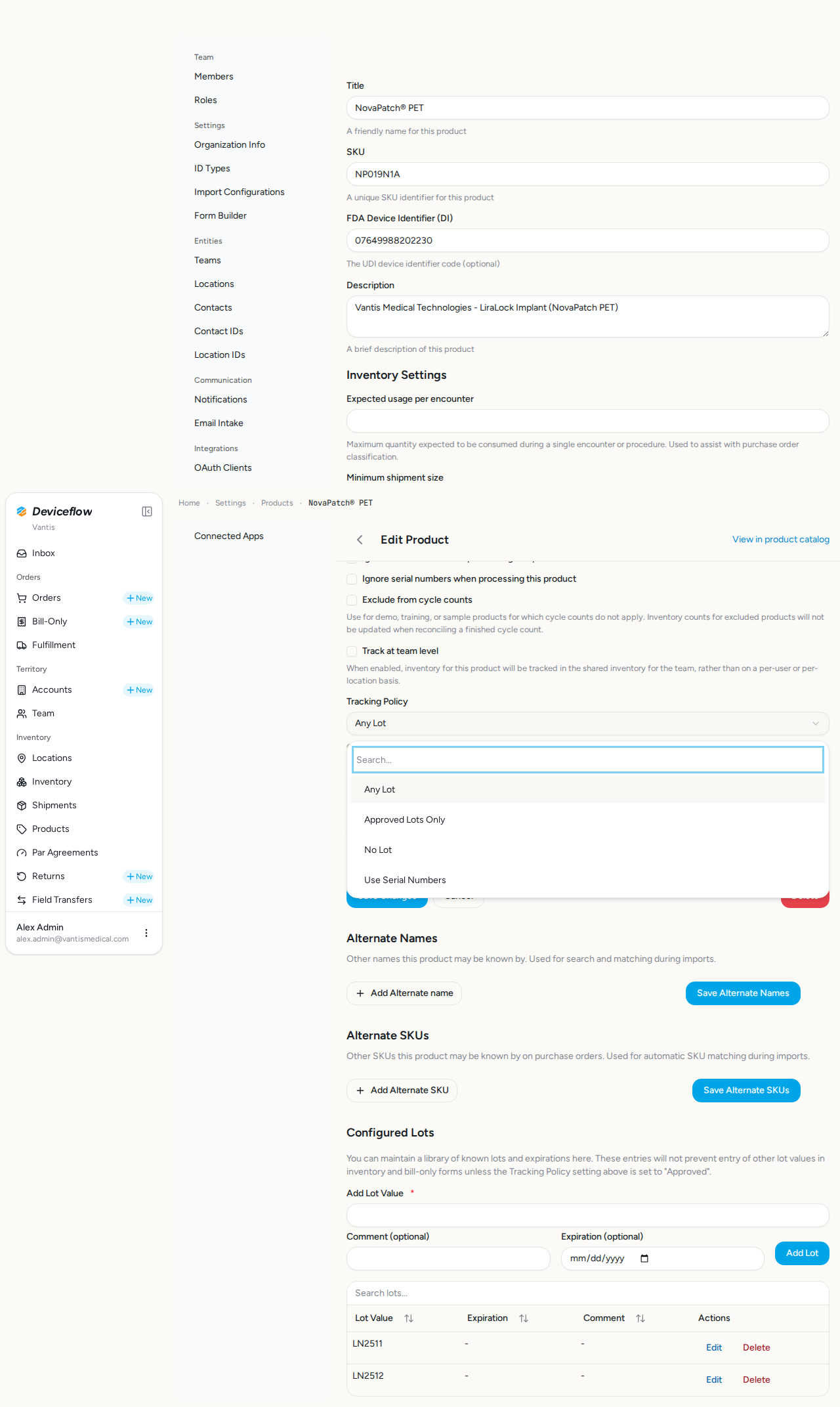
3. Step 3: All policy options visible — ✅ PASS
Section titled “3. Step 3: All policy options visible — ✅ PASS”What this step proves:
The admin opens the Tracking Policy dropdown and confirms all four policy options are available: “Any Lot”, “Approved Lots Only”, “No Lot”, and “Use Serial Numbers”. This demonstrates that the system supports multiple per-product tracking policies.
Screenshots:
Video recording:
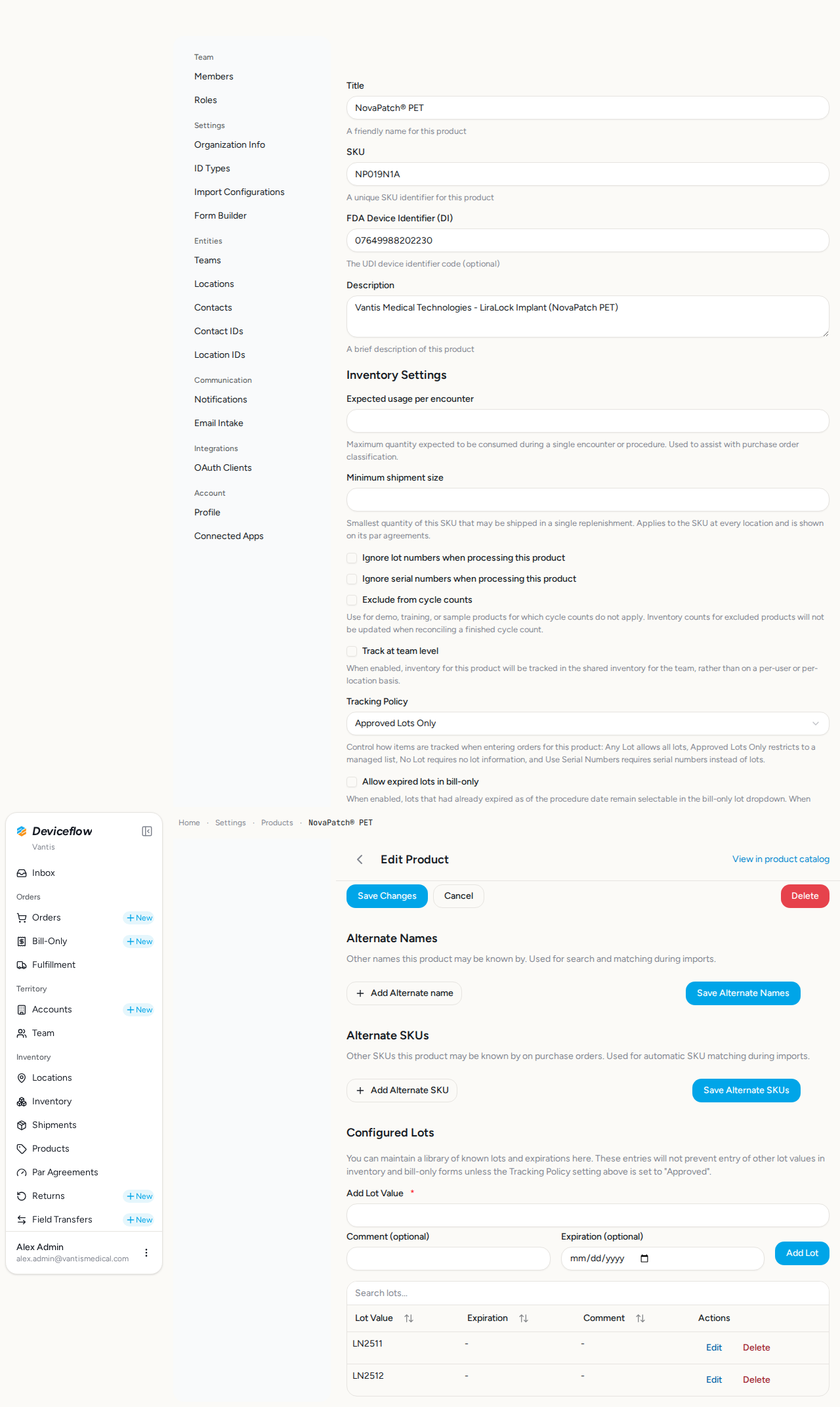
4. Step 4a: Approved Lots Only selected — ✅ PASS
Section titled “4. Step 4a: Approved Lots Only selected — ✅ PASS”What this step proves:
The “Approved Lots Only” policy is selected for Product A (NovaPatch), changing the lot tracking mode from free-text entry to a managed dropdown of pre-approved lot values.
Screenshots:
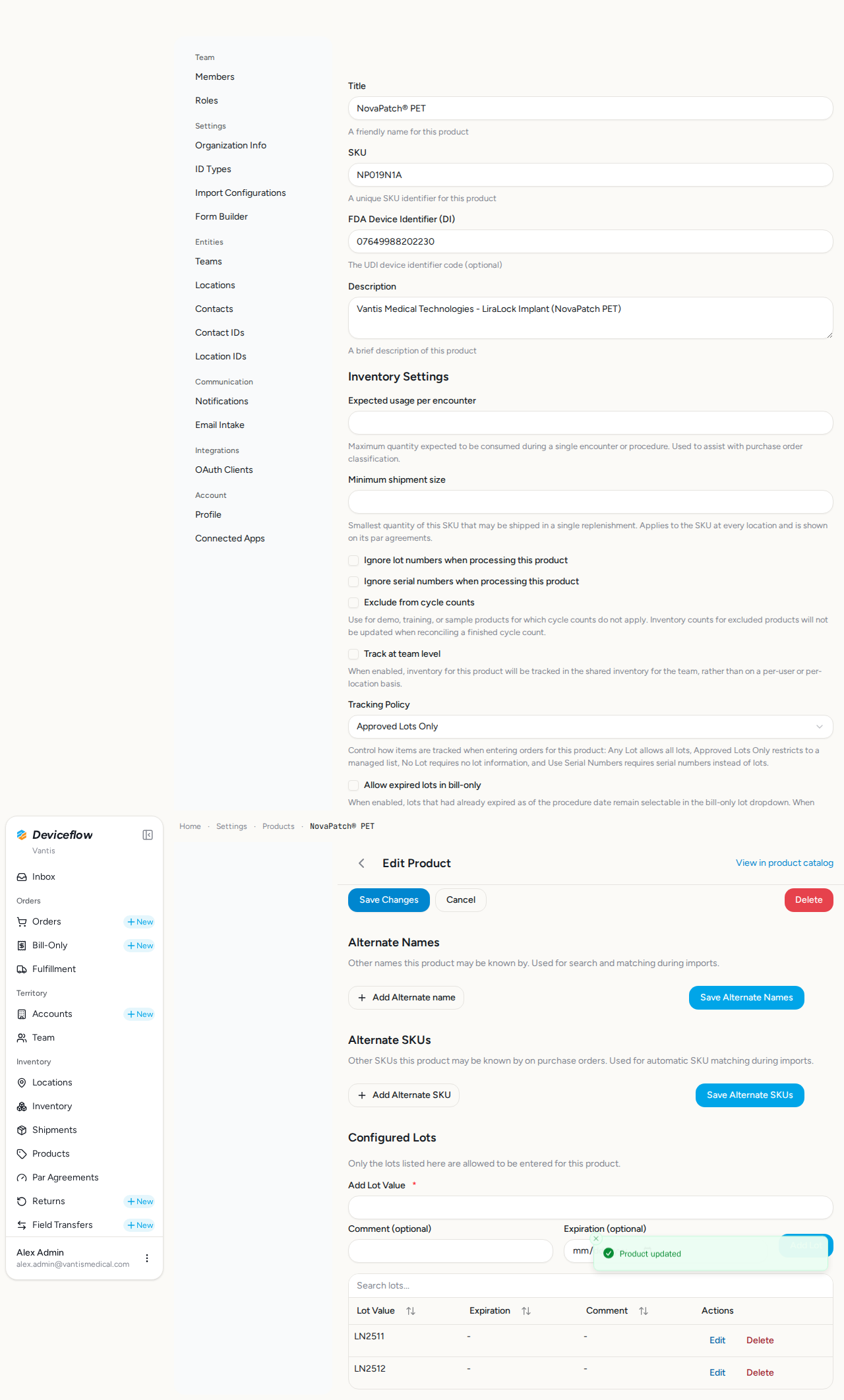
5. Step 4b: Approved policy saved — ✅ PASS
Section titled “5. Step 4b: Approved policy saved — ✅ PASS”What this step proves:
The product form is saved and the page reloads, confirming that the “Approved Lots Only” policy is persisted for Product A. A Configured Lots section now appears so approved lot values can be added.
Audit events generated by this step:
(Evidence matched by declared name — step timing not available or no events fell in window)
| Time | Type | Action | User | Org | Performed |
|---|---|---|---|---|---|
| 2026-09-29 02:31:32Z | product_settings | product.settings.update | alex.admin@vantismedical.com | Vantis | — |
| 2026-09-29 02:32:15Z | product_settings | product.settings.update | alex.admin@vantismedical.com | Vantis | — |
| 2026-09-29 02:32:34Z | product_settings | product.settings.update | alex.admin@vantismedical.com | Vantis | — |
| 2026-09-29 02:32:52Z | product_settings | product.settings.update | alex.admin@vantismedical.com | Vantis | — |
Screenshots:
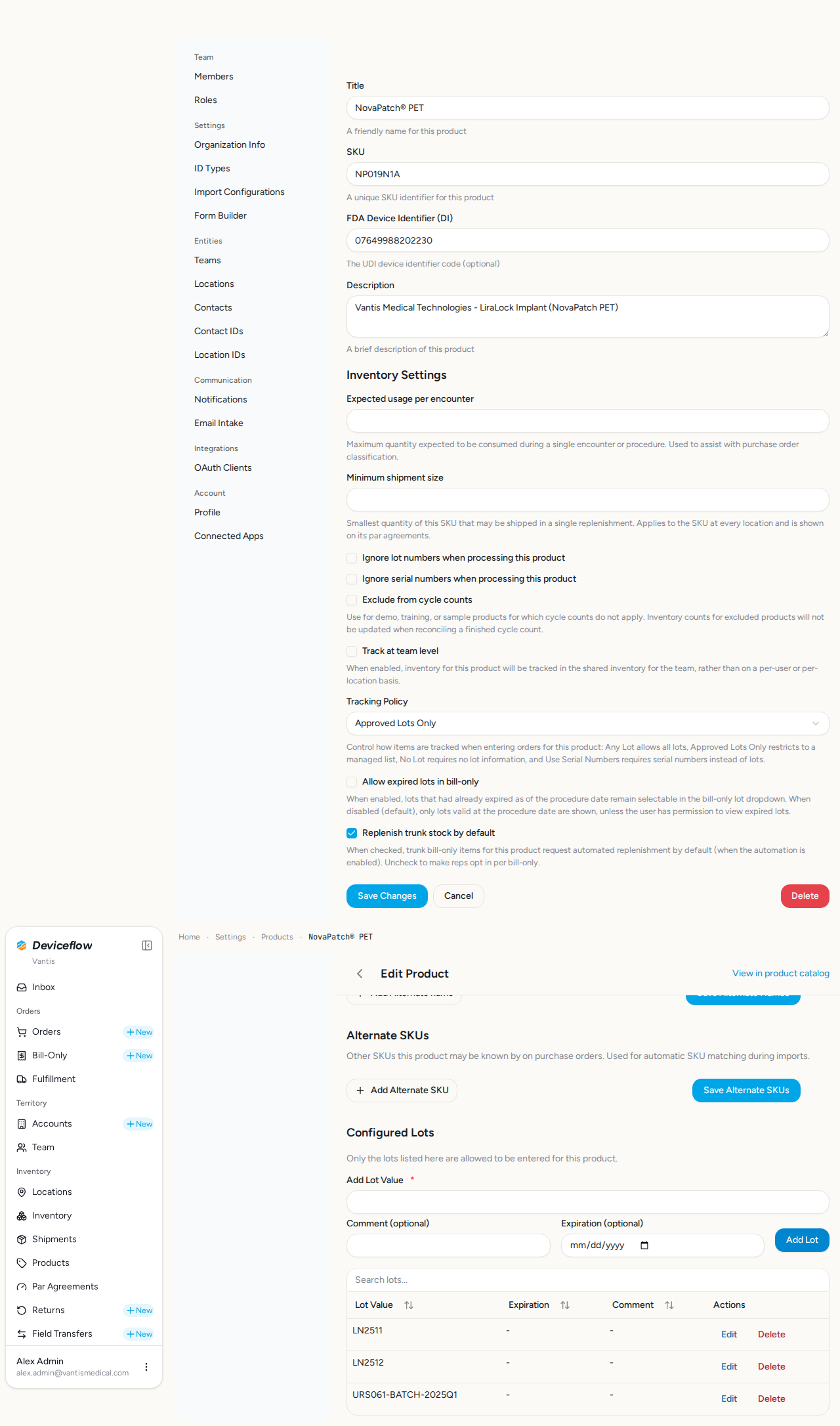
6. Step 5: Add approved lots — ✅ PASS
Section titled “6. Step 5: Add approved lots — ✅ PASS”What this step proves:
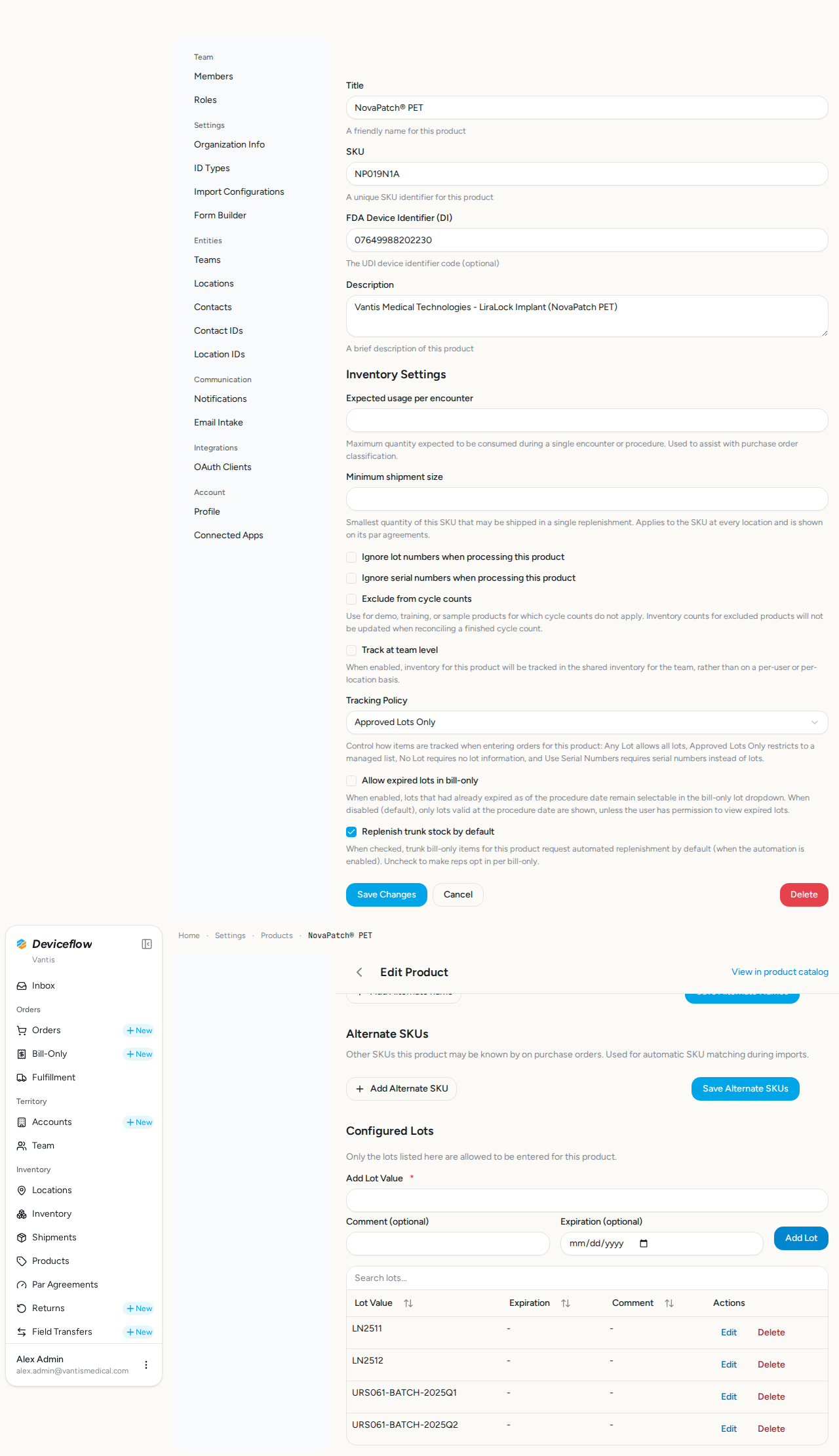
Two approved lot values (URS061-BATCH-2025-Q1 and URS061-BATCH-2025-Q2) are added to Product A. Only these values will be available in the lot dropdown when creating an order for this product.
Audit events generated by this step:
(Evidence scoped to step execution window: 2026-09-29T02:31:43.336Z → 2026-09-29T02:31:45.055Z)
| Time | Type | Action | User | Org | Performed |
|---|---|---|---|---|---|
| 2026-09-29 02:31:44Z | decision | product.allowed_lot.add | alex.admin@vantismedical.com | Vantis | yes |
Screenshots:
Video recording:
7. Step 6: Product B default policy — ✅ PASS
Section titled “7. Step 6: Product B default policy — ✅ PASS”What this step proves:
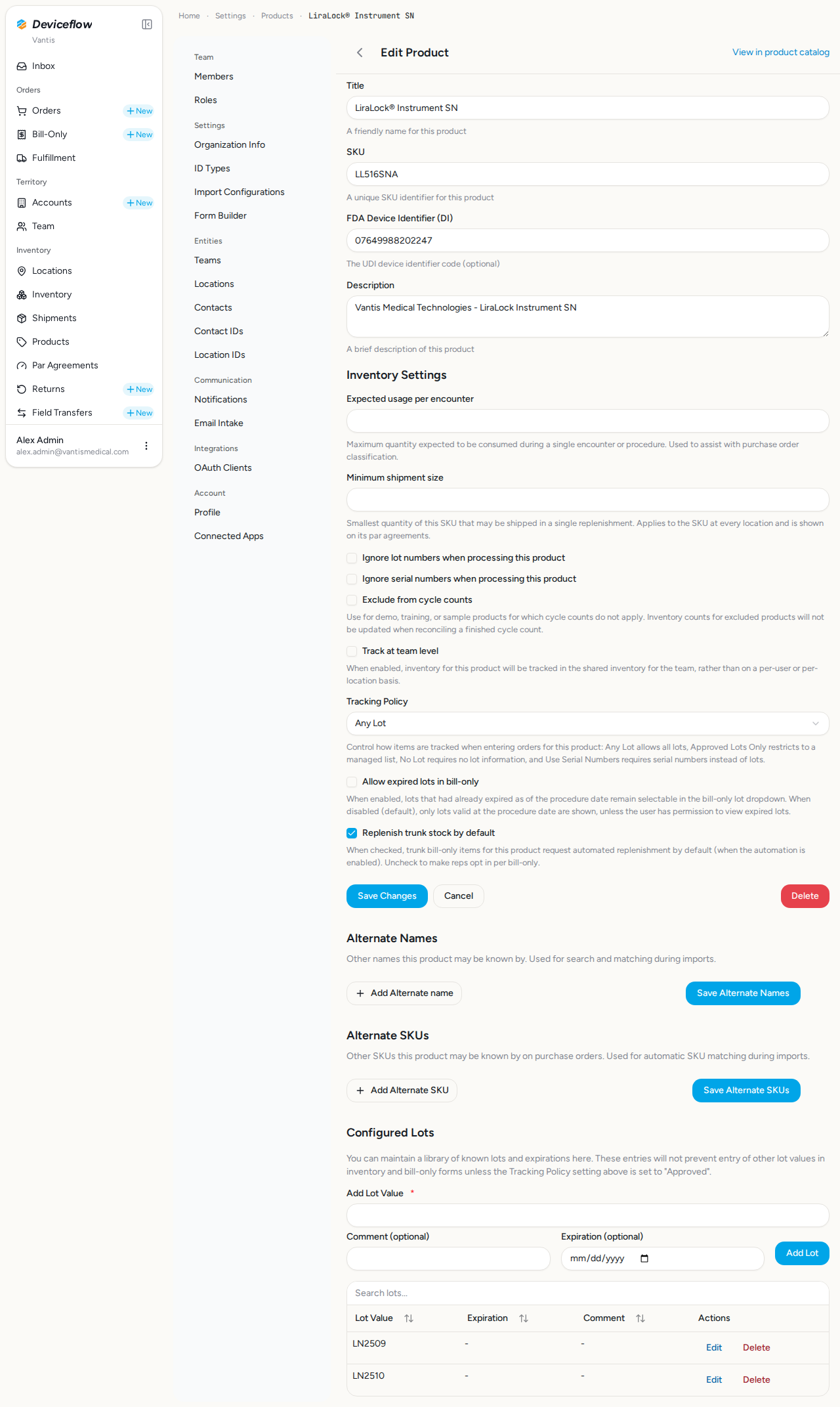
Product B (LiraLock) is confirmed to still have the default “Any Lot” policy, providing a contrast that demonstrates policies are tracked per product independently.
Screenshots:
Video recording:
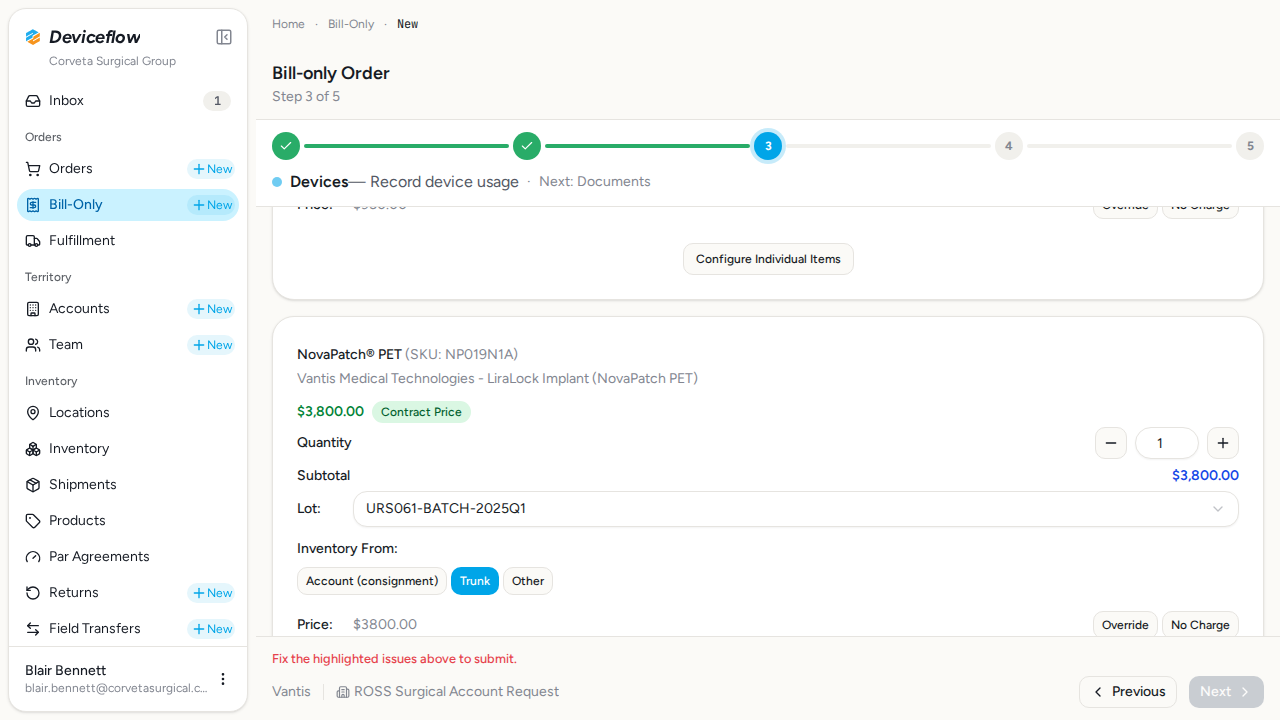
8. Step 7: LOT enforcement — ✅ PASS
Section titled “8. Step 7: LOT enforcement — ✅ PASS”What this step proves:
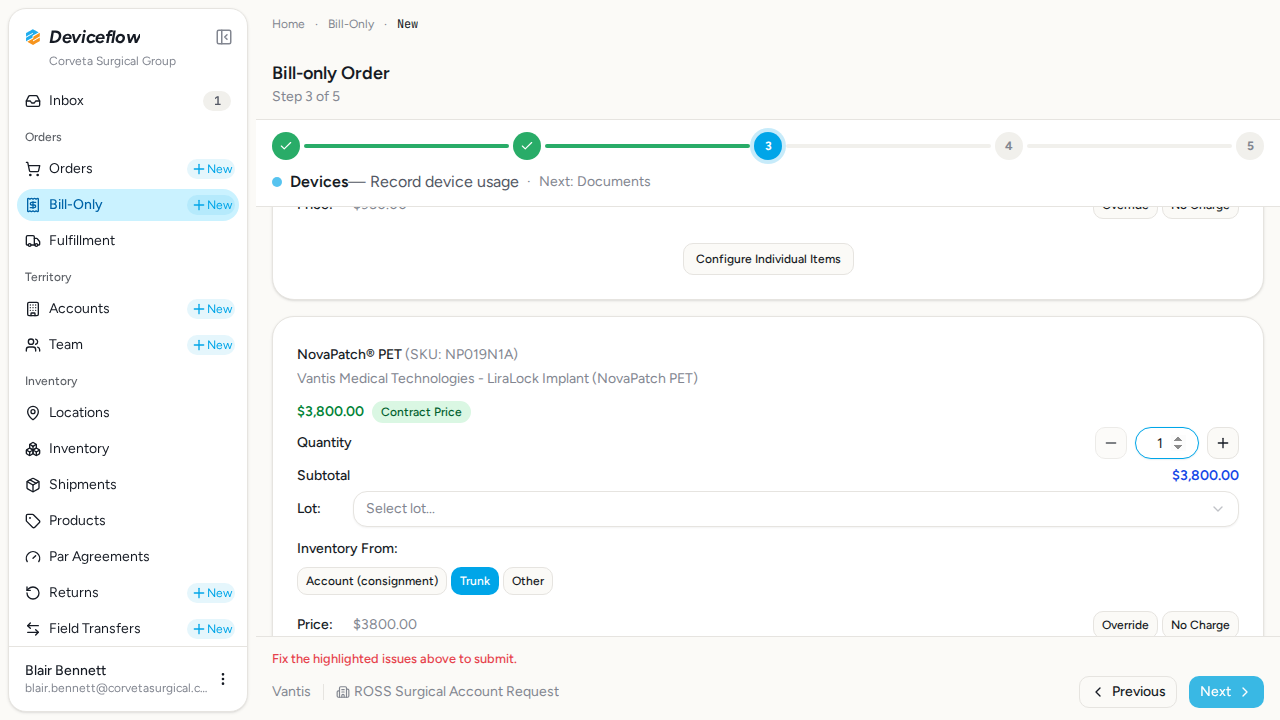
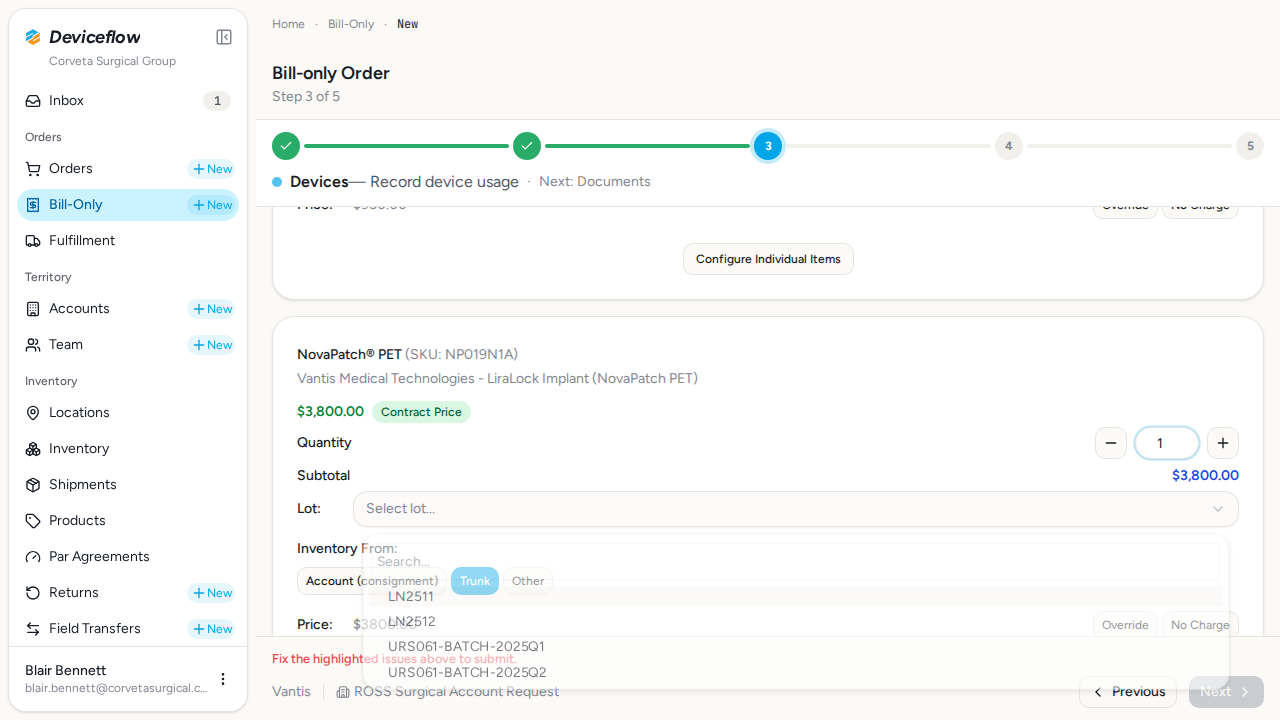
A sales rep starts a bill-only order and adds both products. NovaPatch (Approved Lots Only) renders a dropdown restricted to the two configured lot values, while LiraLock (Any Lot) renders a free-text input. This confirms the per-product LOT policy drives the downstream UI.
Screenshots:
Video recording:
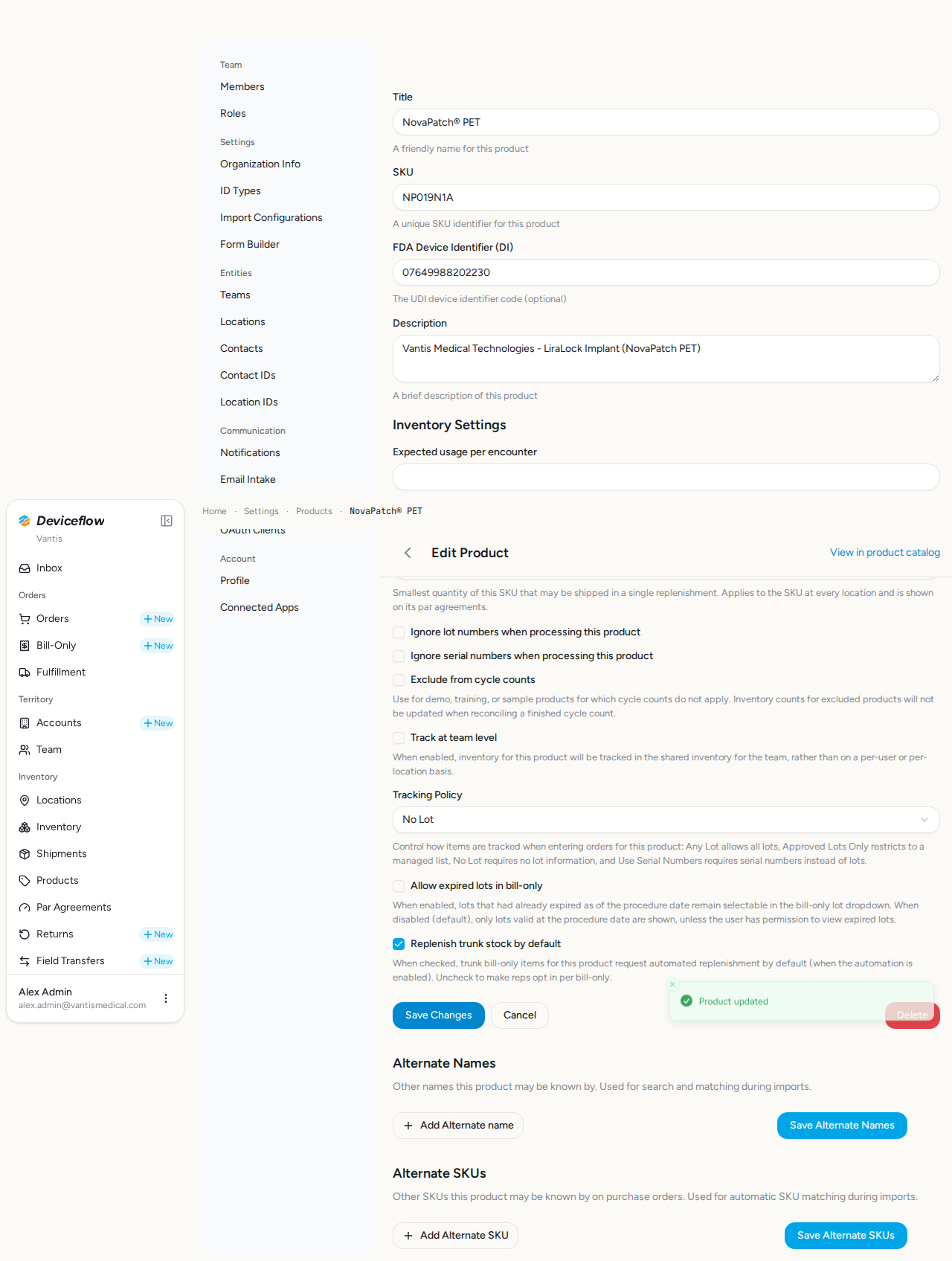
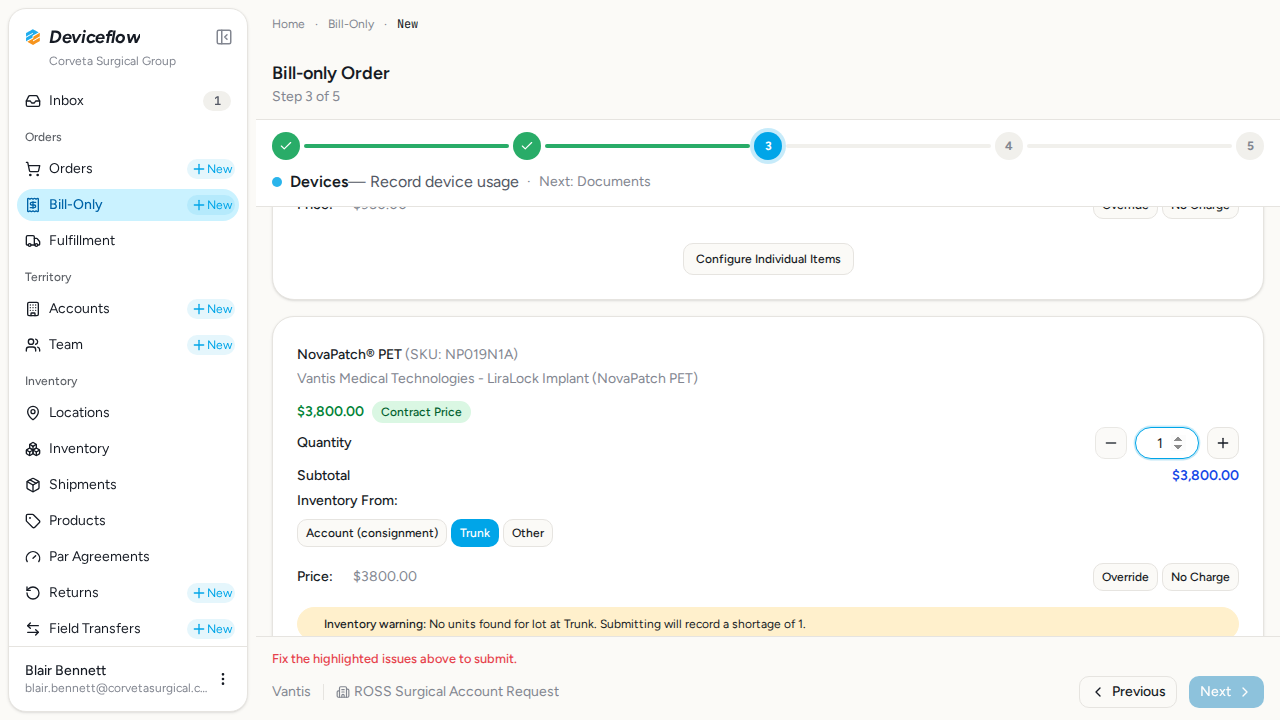
9. Step 8: No Lot policy suppresses lot input — ✅ PASS
Section titled “9. Step 8: No Lot policy suppresses lot input — ✅ PASS”What this step proves:
Product A is switched to the “No Lot” policy. When a sales rep adds NovaPatch to a bill-only order, no lot or serial field is rendered on the NovaPatch row. LiraLock (still “Any Lot”) continues to render its free-text lot input, confirming each product’s policy is evaluated independently at order-entry time.
Audit events generated by this step:
(Evidence scoped to step execution window: 2026-09-29T02:32:15.558Z → 2026-09-29T02:32:25.189Z)
| Time | Type | Action | User | Org | Performed |
|---|---|---|---|---|---|
| 2026-09-29 02:32:17Z | user_log | user:login | blair.bennett@corvetasurgical.com | Corveta Surgical Group | — |
| 2026-09-29 02:32:22Z | decision | bill_only_order.duplicate_submission_block | blair.bennett@corvetasurgical.com | Corveta Surgical Group | no |
Screenshots:
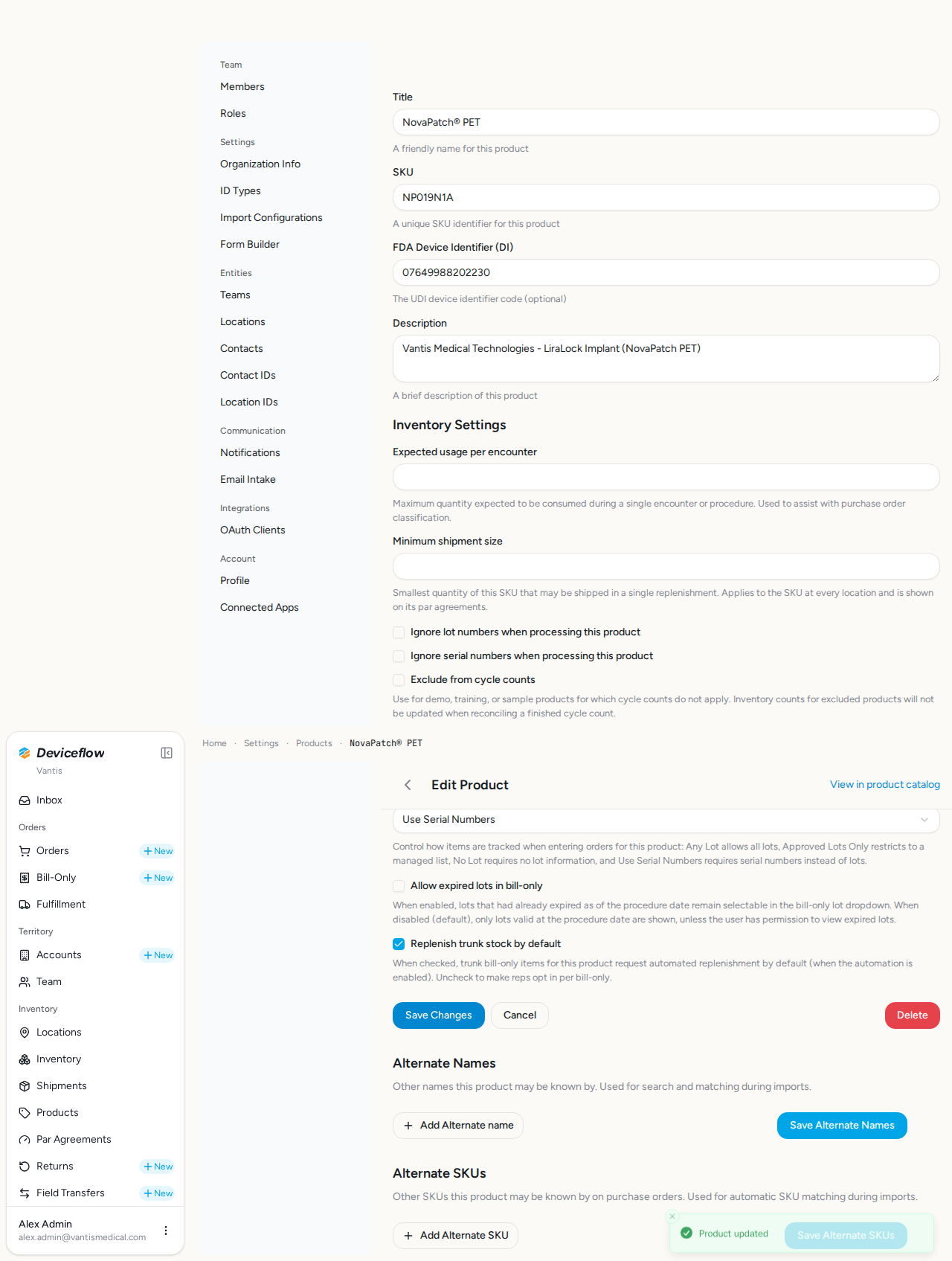
10. Step 9: Serial Numbers policy shows serial input — ✅ PASS
Section titled “10. Step 9: Serial Numbers policy shows serial input — ✅ PASS”What this step proves:
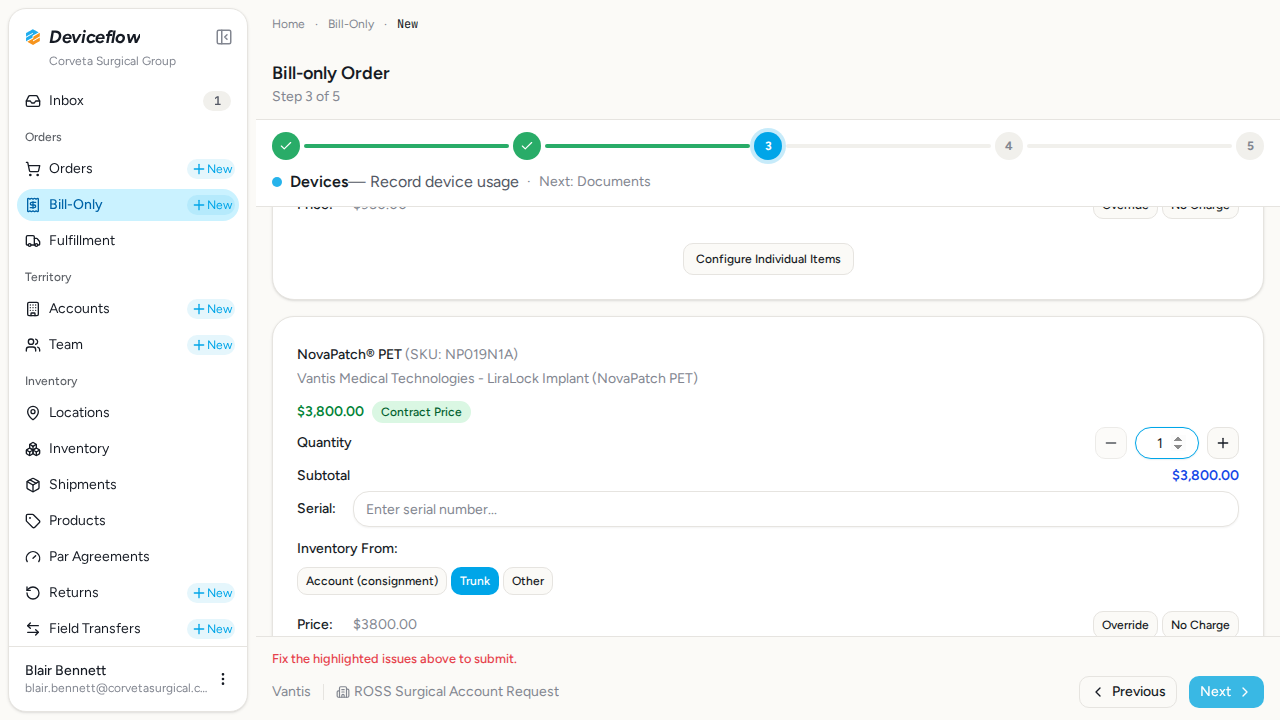
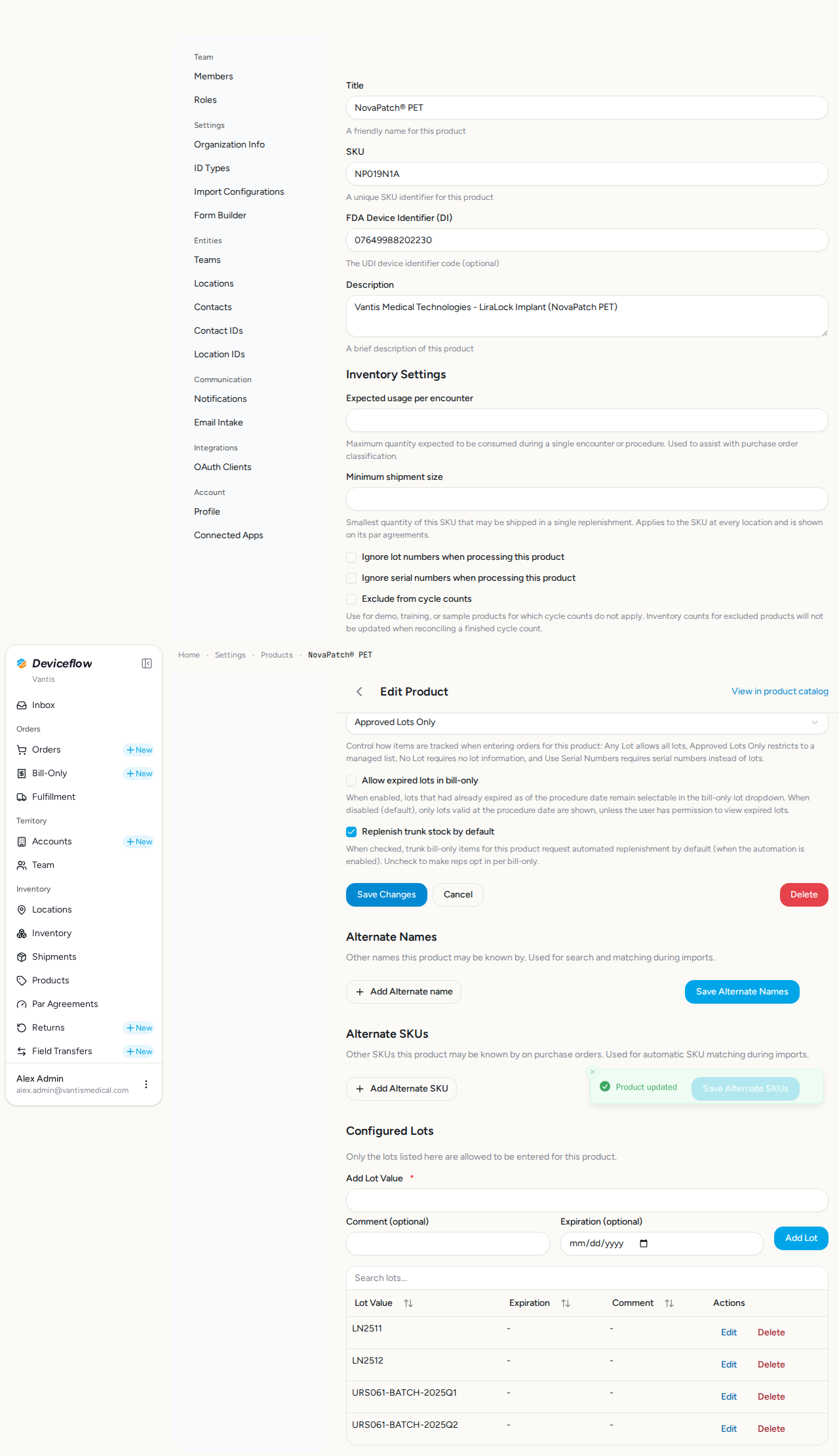
Product A is switched to the “Use Serial Numbers” policy. When the sales rep adds NovaPatch to a bill-only order, the lot input is replaced with a serial-number input (placeholder “Enter serial number…”). After the evidence is captured, Product A is restored to “Approved Lots Only” so the final database validation phase matches the persisted state established in Steps 4–5.
Audit events generated by this step:
(Evidence scoped to step execution window: 2026-09-29T02:32:34.375Z → 2026-09-29T02:32:53.145Z)
| Time | Type | Action | User | Org | Performed |
|---|---|---|---|---|---|
| 2026-09-29 02:32:35Z | user_log | user:login | blair.bennett@corvetasurgical.com | Corveta Surgical Group | — |
| 2026-09-29 02:32:41Z | decision | bill_only_order.duplicate_submission_block | blair.bennett@corvetasurgical.com | Corveta Surgical Group | no |
| 2026-09-29 02:32:46Z | user_log | user:login | alex.admin@vantismedical.com | Vantis | — |
| 2026-09-29 02:32:52Z | product_settings | product.settings.update | alex.admin@vantismedical.com | Vantis | — |
Screenshots:
Database Validations
Section titled “Database Validations”The following SQL queries ran against the application database after the Playwright scenarios completed. Each query asserts a specific condition that proves the feature under test persisted its data correctly.
Product A (NovaPatch) lot_policy = “approved” — ✅ PASS
Section titled “Product A (NovaPatch) lot_policy = “approved” — ✅ PASS”Assertion: Row for SKU NP019N1A should have lot_policy = ‘approved’
SELECT id, sku, title, lot_policy, updated_at FROM org_products WHERE organization_id = $1 AND sku = $2| id | sku | title | lot_policy | updated_at |
|---|---|---|---|---|
| 01989ca2-6a54-7834-8376-06a0251bacd8 | NP019N1A | NovaPatch® PET | approved | 2026-09-29T02:32:52.831Z |
Product B (LiraLock) lot_policy = “any” — ✅ PASS
Section titled “Product B (LiraLock) lot_policy = “any” — ✅ PASS”Assertion: Row for SKU LL516SNA should have lot_policy = ‘any’
SELECT id, sku, title, lot_policy, updated_at FROM org_products WHERE organization_id = $1 AND sku = $2| id | sku | title | lot_policy | updated_at |
|---|---|---|---|---|
| 01989ca1-f2f8-7ab7-8269-7179342797cc | LL516SNA | LiraLock® Instrument SN | any | 2026-09-29T02:30:51.763Z |
Approved lots saved for Product A — ✅ PASS
Section titled “Approved lots saved for Product A — ✅ PASS”Assertion: URS061-prefixed allowed-lot rows for NovaPatch should be exactly URS061-BATCH-2025Q1, URS061-BATCH-2025Q2
SELECT pal.lot_value, pal.comment, pal.expiration FROM org_product_allowed_lots pal JOIN org_products p ON p.id = pal.org_product_id WHERE p.organization_id = $1 AND p.sku = $2 AND pal.lot_value LIKE 'URS061-%' ORDER BY pal.lot_value| lot_value | comment | expiration |
|---|---|---|
| URS061-BATCH-2025Q1 | NULL | NULL |
| URS061-BATCH-2025Q2 | NULL | NULL |
Product B has no URS061- allowed lots — ✅ PASS
Section titled “Product B has no URS061- allowed lots — ✅ PASS”Assertion: LiraLock should have no test-prefixed allowed-lot rows (contrast case)
SELECT pal.lot_value FROM org_product_allowed_lots pal JOIN org_products p ON p.id = pal.org_product_id WHERE p.organization_id = $1 AND p.sku = $2 AND pal.lot_value LIKE 'URS061-%'No rows returned
Audit & Email Assertion Ledger
Section titled “Audit & Email Assertion Ledger”Per-declaration outcome of every expectedAuditActions and expectedEmailTemplates entry written into the orchestrator. Missing evidence here is a real test failure, not a soft warning.
Audit Action Assertions
Section titled “Audit Action Assertions”Each row asserts that a declared expectedAuditActions entry produced a matching row in audit_events. A ❌ flips overall status to FAIL — the declaration is real proof, not just an annotation.
| Step | Expected Audit Action | Found |
|---|---|---|
| Step 4b: Approved policy saved | product_settings:product.settings.update | ✅ |
| Step 5: Add approved lots | decision:product.allowed_lot.add | ✅ |
| Step 8: No Lot policy suppresses lot input | product_settings:product.settings.update | ✅ |
| Step 9: Serial Numbers policy shows serial input | product_settings:product.settings.update | ✅ |
Audit Log Events
Section titled “Audit Log Events”Every row written to audit_events while this test was running (scoped to the demo organizations). Provides compliance evidence that user actions are traced end-to-end (URS-003).
Capture window start: 2026-09-29T02:30:49.919Z
SELECT ae.created_at, ae.event_type, ae.action, ae.user_id, u.email AS user_email, ae.organization_id, o.name AS organization_name, ae.object_id, ae.secondary_object_id, ae.payload, ae.route, ae.trace_id FROM audit_events ae LEFT JOIN users u ON u.id = ae.user_id LEFT JOIN organizations o ON o.id = ae.organization_id WHERE ae.created_at >= $1 AND ae.organization_id = ANY($2::uuid[]) ORDER BY ae.created_at ASC21 event(s) captured:
| Time | Type | Action | User | Org | Object ID | Performed | Reason |
|---|---|---|---|---|---|---|---|
| 2026-09-29 02:30:57Z | user_log | user:login | alex.admin@vantismedical.com | Vantis | — | — | |
| 2026-09-29 02:31:05Z | user_log | user:login | alex.admin@vantismedical.com | Vantis | — | — | |
| 2026-09-29 02:31:14Z | user_log | user:login | alex.admin@vantismedical.com | Vantis | — | — | |
| 2026-09-29 02:31:25Z | user_log | user:login | alex.admin@vantismedical.com | Vantis | — | — | |
| 2026-09-29 02:31:32Z | product_settings | product.settings.update | alex.admin@vantismedical.com | Vantis | 01989ca2-6a54-7834-8376-06a0251bacd8 | — | |
| 2026-09-29 02:31:37Z | user_log | user:login | alex.admin@vantismedical.com | Vantis | — | — | |
| 2026-09-29 02:31:42Z | decision | product.allowed_lot.add | alex.admin@vantismedical.com | Vantis | 01989ca2-6a54-7834-8376-06a0251bacd8 | yes | Approved lot value added to product |
| 2026-09-29 02:31:44Z | decision | product.allowed_lot.add | alex.admin@vantismedical.com | Vantis | 01989ca2-6a54-7834-8376-06a0251bacd8 | yes | Approved lot value added to product |
| 2026-09-29 02:31:47Z | user_log | user:login | alex.admin@vantismedical.com | Vantis | — | — | |
| 2026-09-29 02:31:54Z | user_log | user:login | blair.bennett@corvetasurgical.com | Corveta Surgical Group | — | — | |
| 2026-09-29 02:32:00Z | decision | bill_only_order.duplicate_submission_block | blair.bennett@corvetasurgical.com | Corveta Surgical Group | fea7b8c9-d0e1-2345-0123-456789012345 | no | no_same_day_candidates |
| 2026-09-29 02:32:08Z | user_log | user:login | alex.admin@vantismedical.com | Vantis | — | — | |
| 2026-09-29 02:32:15Z | product_settings | product.settings.update | alex.admin@vantismedical.com | Vantis | 01989ca2-6a54-7834-8376-06a0251bacd8 | — | |
| 2026-09-29 02:32:17Z | user_log | user:login | blair.bennett@corvetasurgical.com | Corveta Surgical Group | — | — | |
| 2026-09-29 02:32:22Z | decision | bill_only_order.duplicate_submission_block | blair.bennett@corvetasurgical.com | Corveta Surgical Group | fea7b8c9-d0e1-2345-0123-456789012345 | no | no_same_day_candidates |
| 2026-09-29 02:32:28Z | user_log | user:login | alex.admin@vantismedical.com | Vantis | — | — | |
| 2026-09-29 02:32:34Z | product_settings | product.settings.update | alex.admin@vantismedical.com | Vantis | 01989ca2-6a54-7834-8376-06a0251bacd8 | — | |
| 2026-09-29 02:32:35Z | user_log | user:login | blair.bennett@corvetasurgical.com | Corveta Surgical Group | — | — | |
| 2026-09-29 02:32:41Z | decision | bill_only_order.duplicate_submission_block | blair.bennett@corvetasurgical.com | Corveta Surgical Group | fea7b8c9-d0e1-2345-0123-456789012345 | no | no_same_day_candidates |
| 2026-09-29 02:32:46Z | user_log | user:login | alex.admin@vantismedical.com | Vantis | — | — | |
| 2026-09-29 02:32:52Z | product_settings | product.settings.update | alex.admin@vantismedical.com | Vantis | 01989ca2-6a54-7834-8376-06a0251bacd8 | — |
Additional Video Evidence
Section titled “Additional Video Evidence”The following screencast recordings were captured but could not be matched to a specific test step. Step-matched recordings appear inline in their respective step sections above.