URS-038 · Bill-Only status fields visible on main BO page
Title: Bill-Only status fields visible on main BO page Date: 2026-09-29T02:30:49.605Z Duration: 113.3s Overall Status: ✅ PASS
User Requirement
Section titled “User Requirement”The system shall support tagging and visibility of the processing status of Bill-Only Orders
Source: User_Requirement_Specifications_Vantis_DeviceFlow.xlsx — the run below proves the system meets this requirement.
Environment
Section titled “Environment”- Inbox URL: http://localhost:41935
- Database: localhost:46835/cc_repinbox_dev
Status: ✅ PASS
Test Steps
Section titled “Test Steps”Each step below corresponds to one Playwright test that ran sequentially. Screenshots and video recordings provide visual evidence of the UI behaviour.
1. Step 1: Main Bill-Only page loads — ✅ PASS
Section titled “1. Step 1: Main Bill-Only page loads — ✅ PASS”What this step proves:
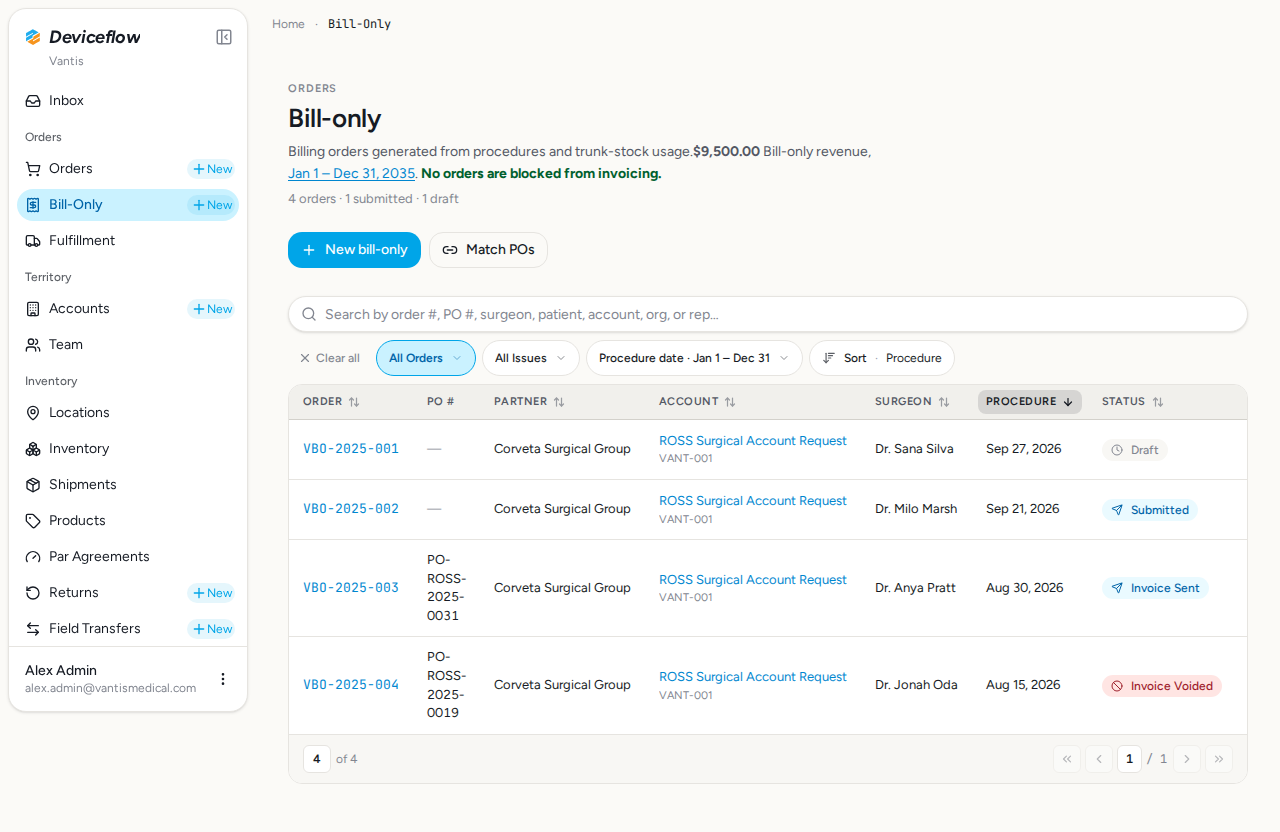
Logs in as alex.admin@vantismedical.com and navigates to /billing with the “All Orders” filter active. Confirms the page heading “Bill-only” is visible and all four seeded Bill-Only Orders appear in the table.
Screenshots:
Video recording:
2. Step 2: Status column visible — ✅ PASS
Section titled “2. Step 2: Status column visible — ✅ PASS”What this step proves:
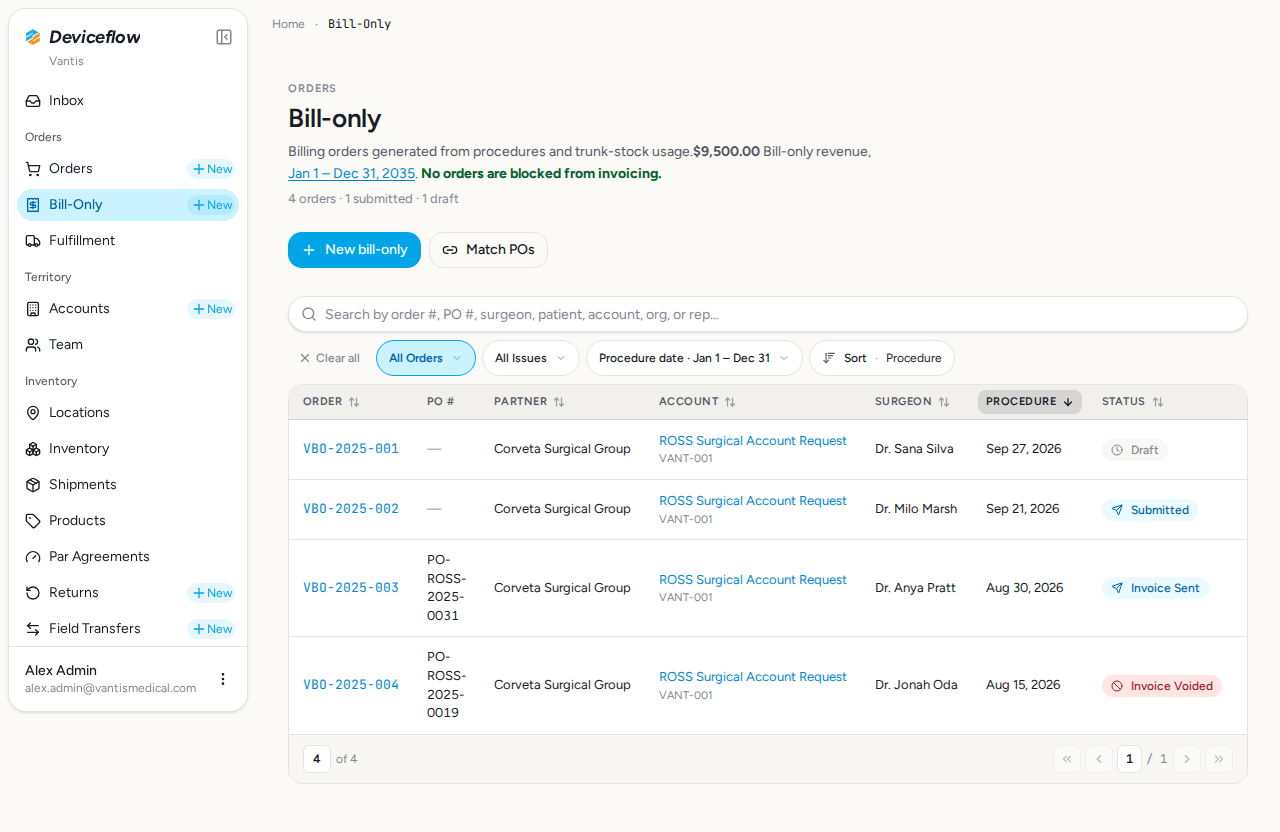
Asserts a sortable “Status” column header is rendered in the Bill-Only Orders DataTable. The column must be present for any status badge to be associated with a specific order row.
Screenshots:
Video recording:
3. Step 3a: VBO-2025-001 status badge — ✅ PASS
Section titled “3. Step 3a: VBO-2025-001 status badge — ✅ PASS”What this step proves:
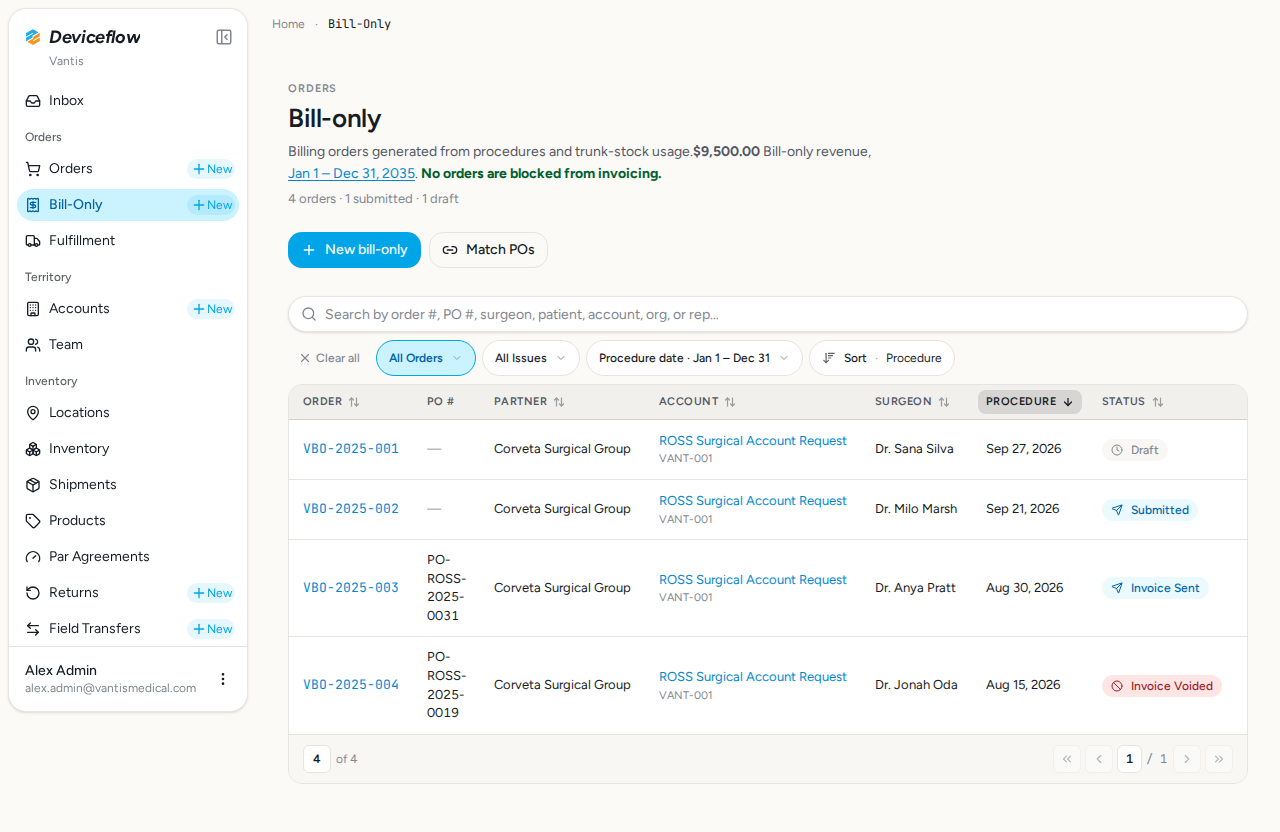
Confirms that VBO-2025-001 (status: draft) displays the “Draft” badge label in its table row. Maps to URS-038 BO-001: enteredInQb=false, invoiced=false.
Screenshots:
Video recording:
4. Step 3b: VBO-2025-002 status badge — ✅ PASS
Section titled “4. Step 3b: VBO-2025-002 status badge — ✅ PASS”What this step proves:
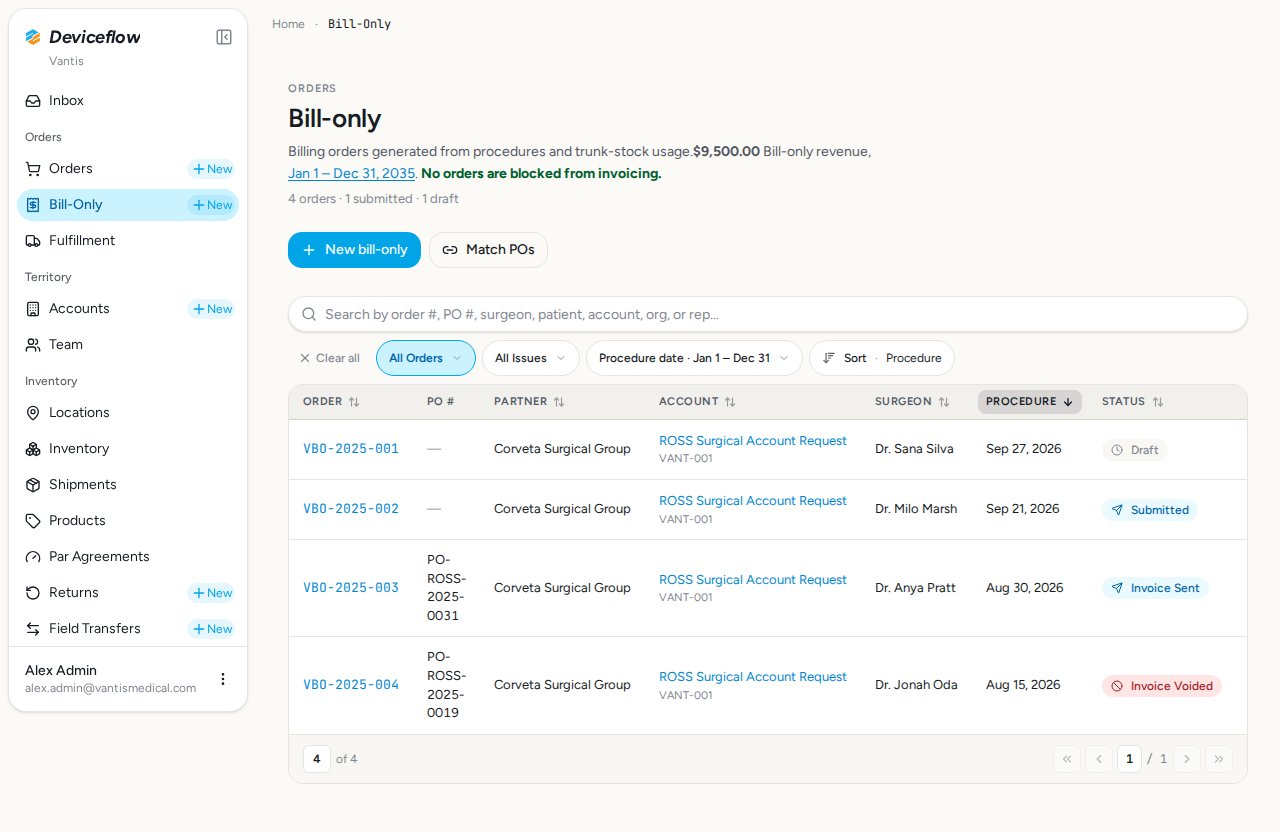
Confirms that VBO-2025-002 (status: submitted) displays the “Submitted” badge label. Maps to URS-038 BO-002: enteredInQb=false, invoiced=false (awaiting QB entry).
Screenshots:
5. Step 3c: VBO-2025-003 status badge — ✅ PASS
Section titled “5. Step 3c: VBO-2025-003 status badge — ✅ PASS”What this step proves:
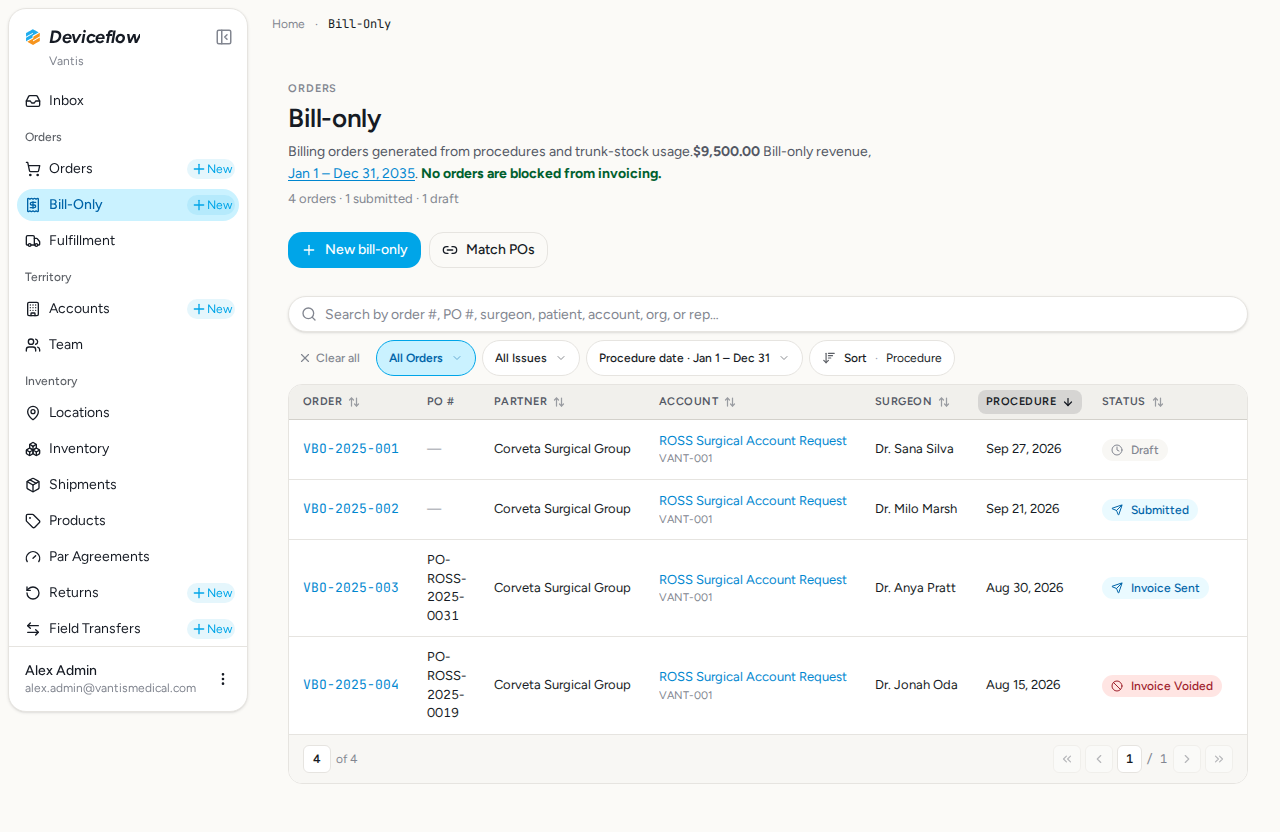
Confirms that VBO-2025-003 (status: invoice_sent) displays the “Invoice Sent” badge label. Maps to URS-038 BO-003: enteredInQb=true, invoiced=true.
Screenshots:
6. Step 3d: VBO-2025-004 status badge — ✅ PASS
Section titled “6. Step 3d: VBO-2025-004 status badge — ✅ PASS”What this step proves:
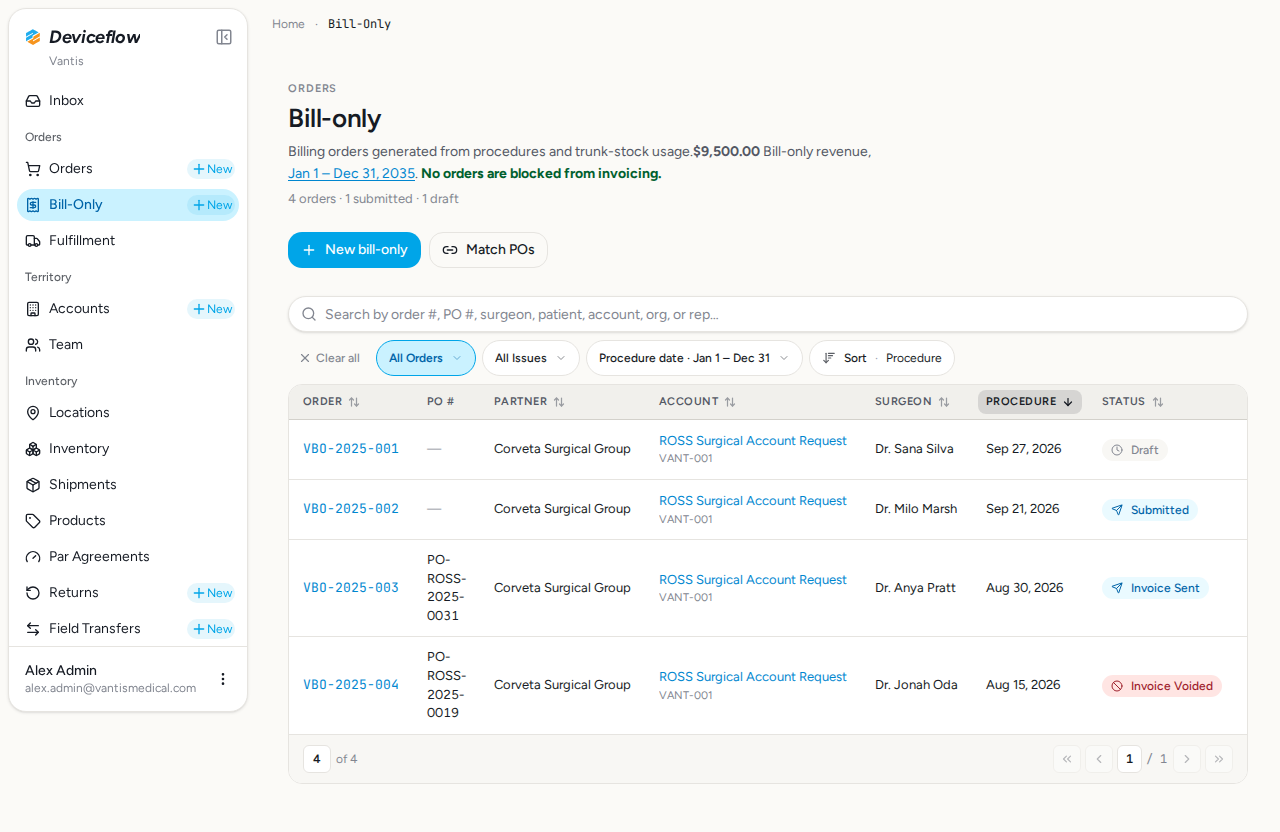
Confirms that VBO-2025-004 (status: invoice_voided) displays the “Invoice Voided” badge label. Maps to URS-038 BO-004: enteredInQb=true, invoiced=true (voided edge case).
Screenshots:
7. Step 4: Status badges color styling — ✅ PASS
Section titled “7. Step 4: Status badges color styling — ✅ PASS”What this step proves:
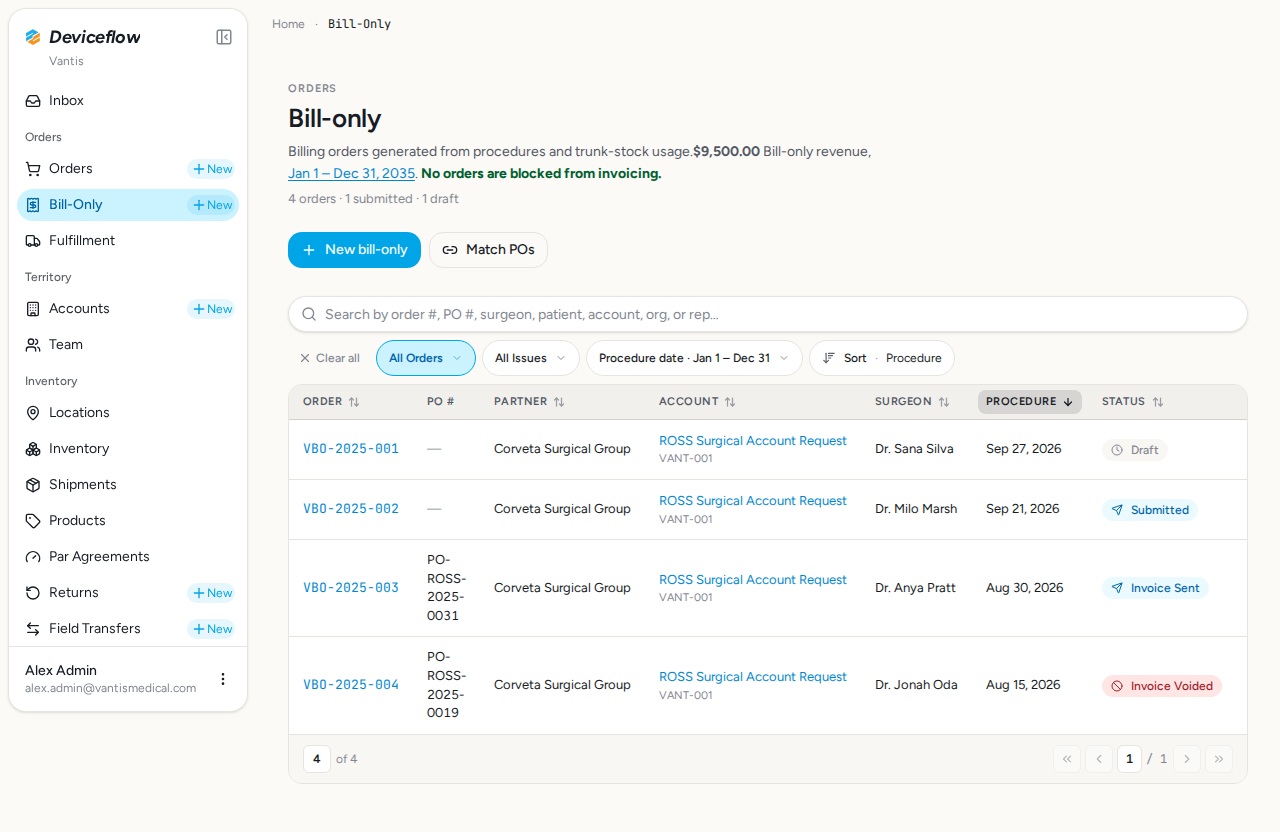
Verifies each status badge renders with the tone-based soft-pill class configured in billingStatusConfig (v3 Badge, DF-3626): Draft=neutral (bg-muted), Submitted=info (bg-[var(—df-info-bg)]), Invoice Sent=info (bg-[var(—df-info-bg)]), Invoice Voided=danger (bg-[var(—df-danger-bg)]). Note: Submitted and Invoice Sent intentionally share the same tone/class.
Screenshots:
Video recording:
8. Step 5a: Filter by Invoice Voided — ✅ PASS
Section titled “8. Step 5a: Filter by Invoice Voided — ✅ PASS”What this step proves:
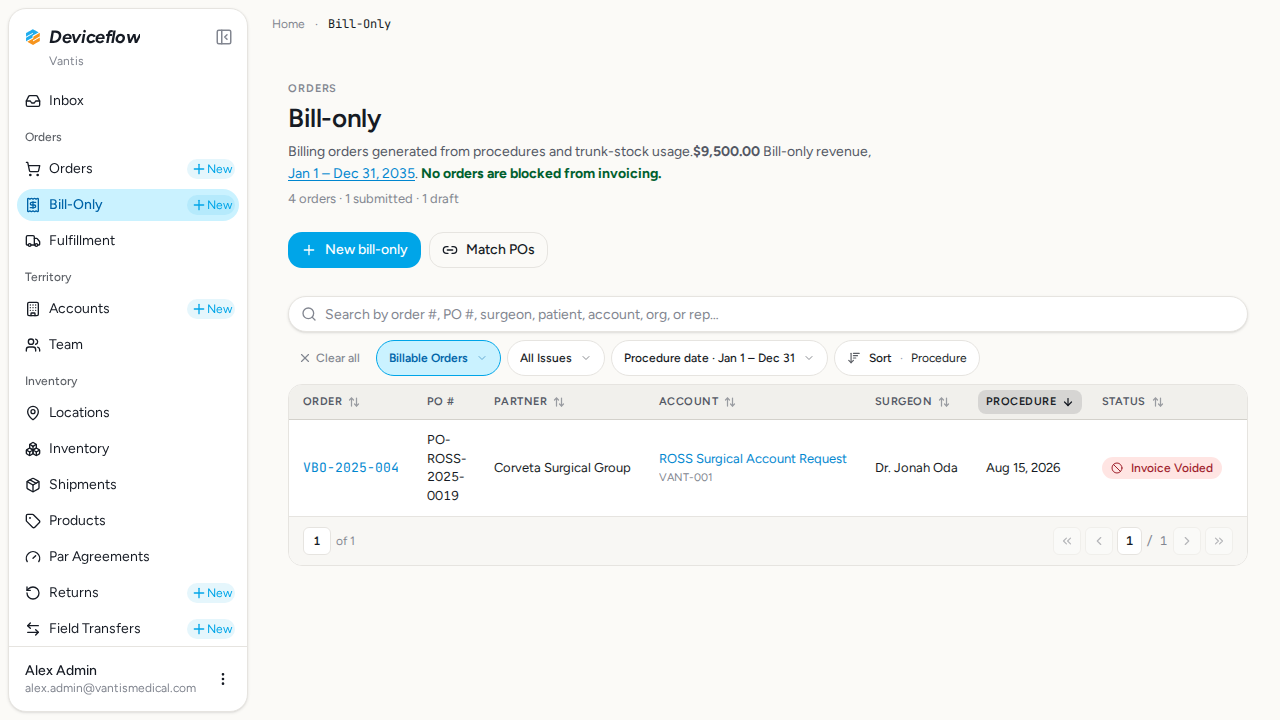
Navigates to /billing?filter=invoice_voided and confirms only VBO-2025-004 is shown. All other seeded orders must be absent from the rendered table, proving the filter correctly narrows the list to one lifecycle stage.
Screenshots:
Video recording:
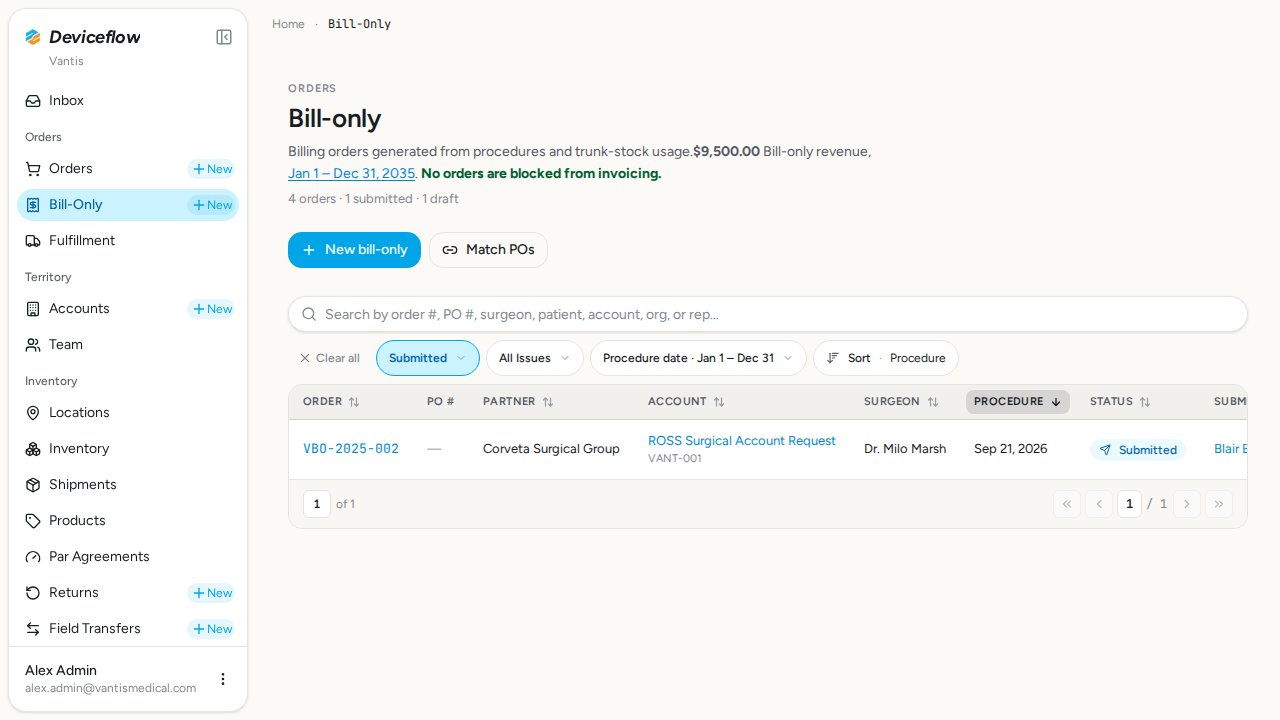
9. Step 5b: Filter by Submitted — ✅ PASS
Section titled “9. Step 5b: Filter by Submitted — ✅ PASS”What this step proves:
Navigates to /billing?filter=submitted and confirms only VBO-2025-002 is shown. All other seeded orders must be absent, proving the filter correctly narrows the list.
Screenshots:
10. Step 6a: Sort by status (asc) — ✅ PASS
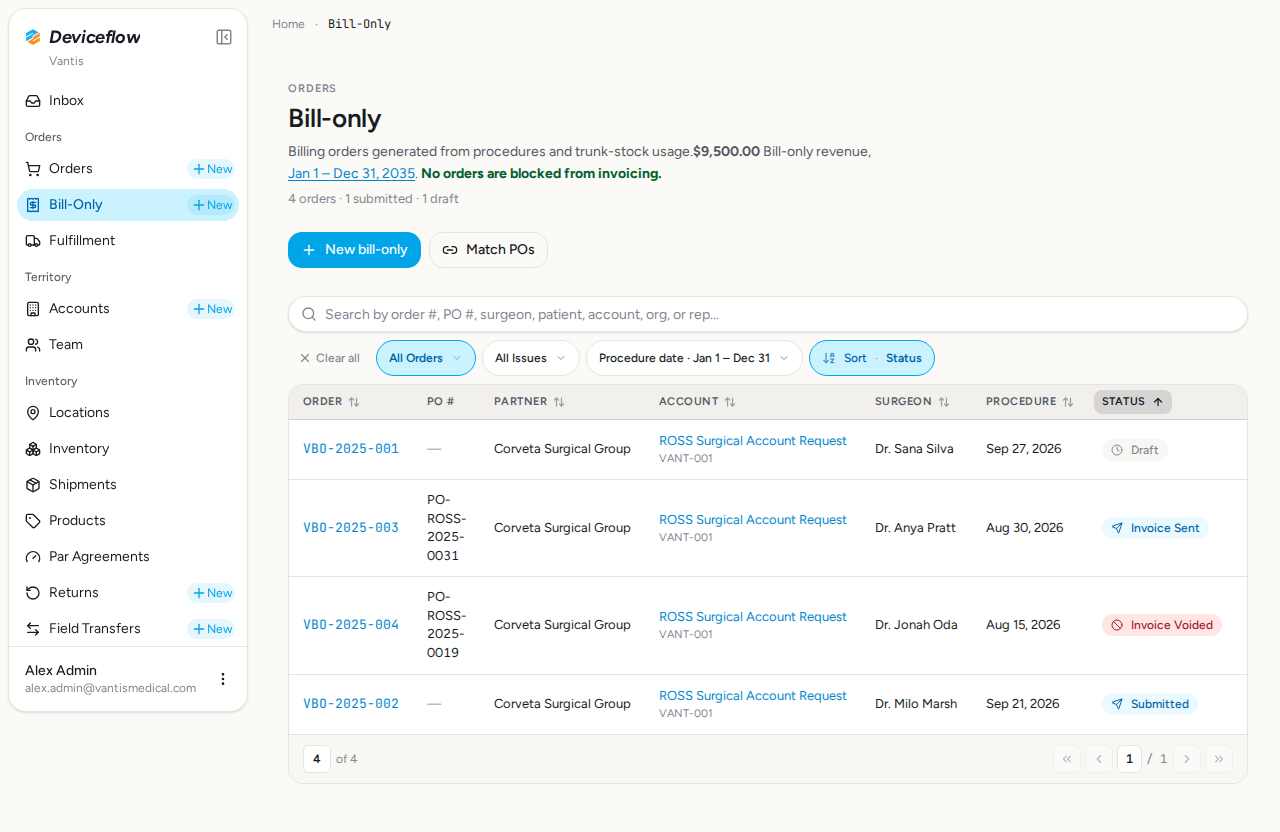
Section titled “10. Step 6a: Sort by status (asc) — ✅ PASS”What this step proves:
Navigates to /billing?filter=all&sortBy=status&sortOrder=asc and confirms the four seeded BOs appear in alphabetical enum order: draft, invoice_sent, invoice_voided, submitted.
Screenshots:
Video recording:
11. Step 6b: Sort by status (desc) — ✅ PASS
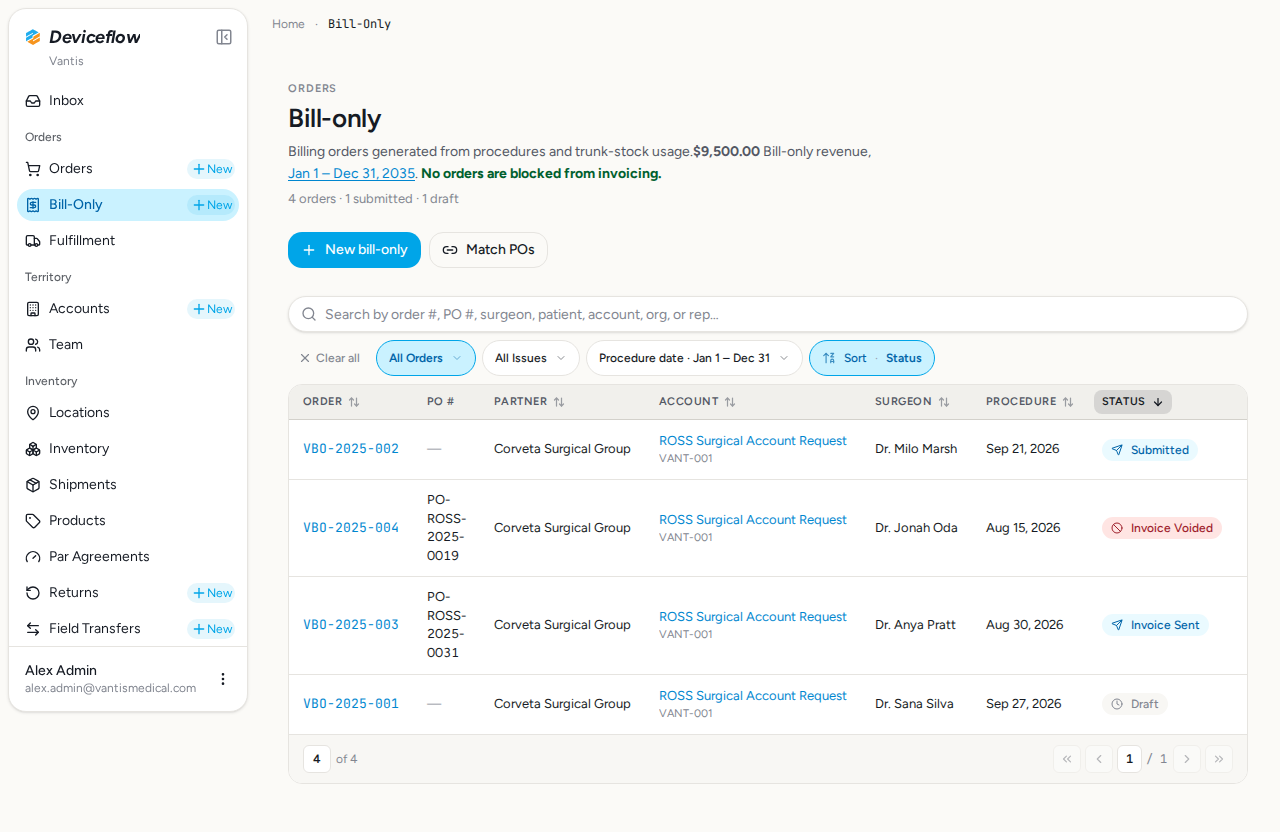
Section titled “11. Step 6b: Sort by status (desc) — ✅ PASS”What this step proves:
Navigates to /billing?filter=all&sortBy=status&sortOrder=desc and confirms the four seeded BOs appear in reverse alphabetical enum order, validating bidirectional sort.
Screenshots:
12. Step 7: Status visible on detail page — ✅ PASS
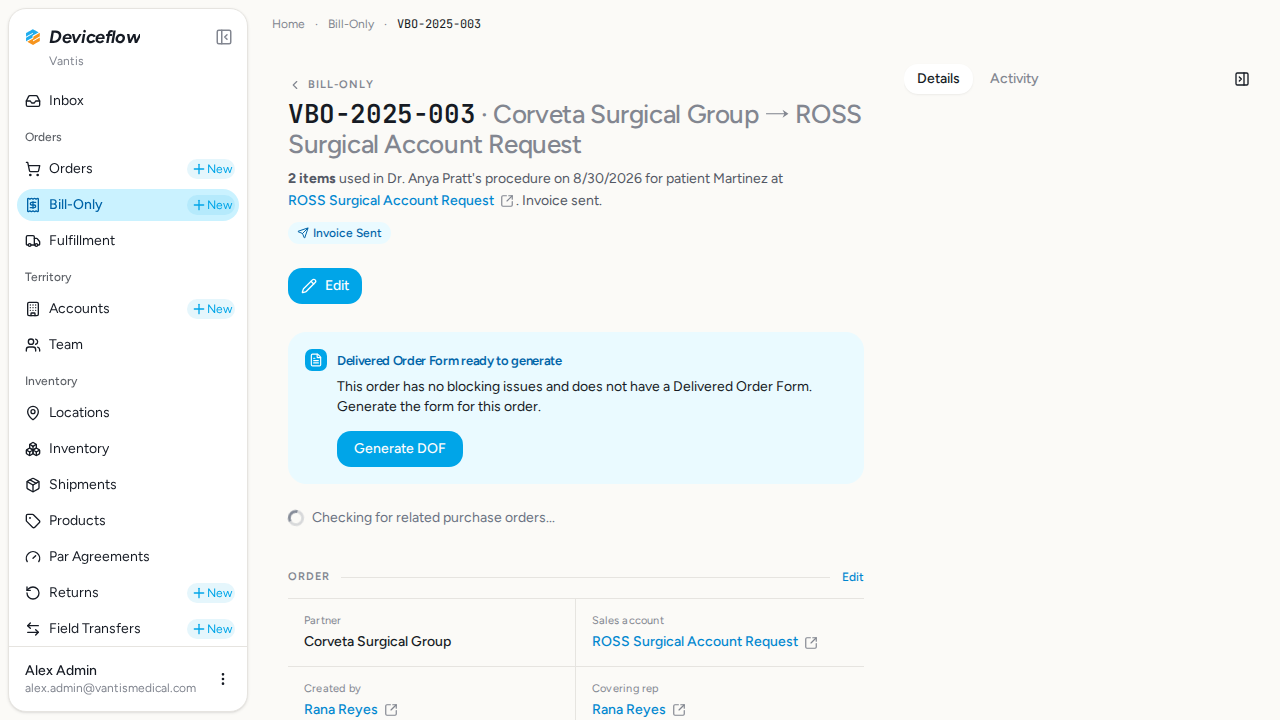
Section titled “12. Step 7: Status visible on detail page — ✅ PASS”What this step proves:
Drills into VBO-2025-003 (Invoice Sent) and confirms the “Invoice Sent” badge label is visible on the BO detail page. The same status badge component used in the list must also render on the detail view.
Screenshots:
Video recording:
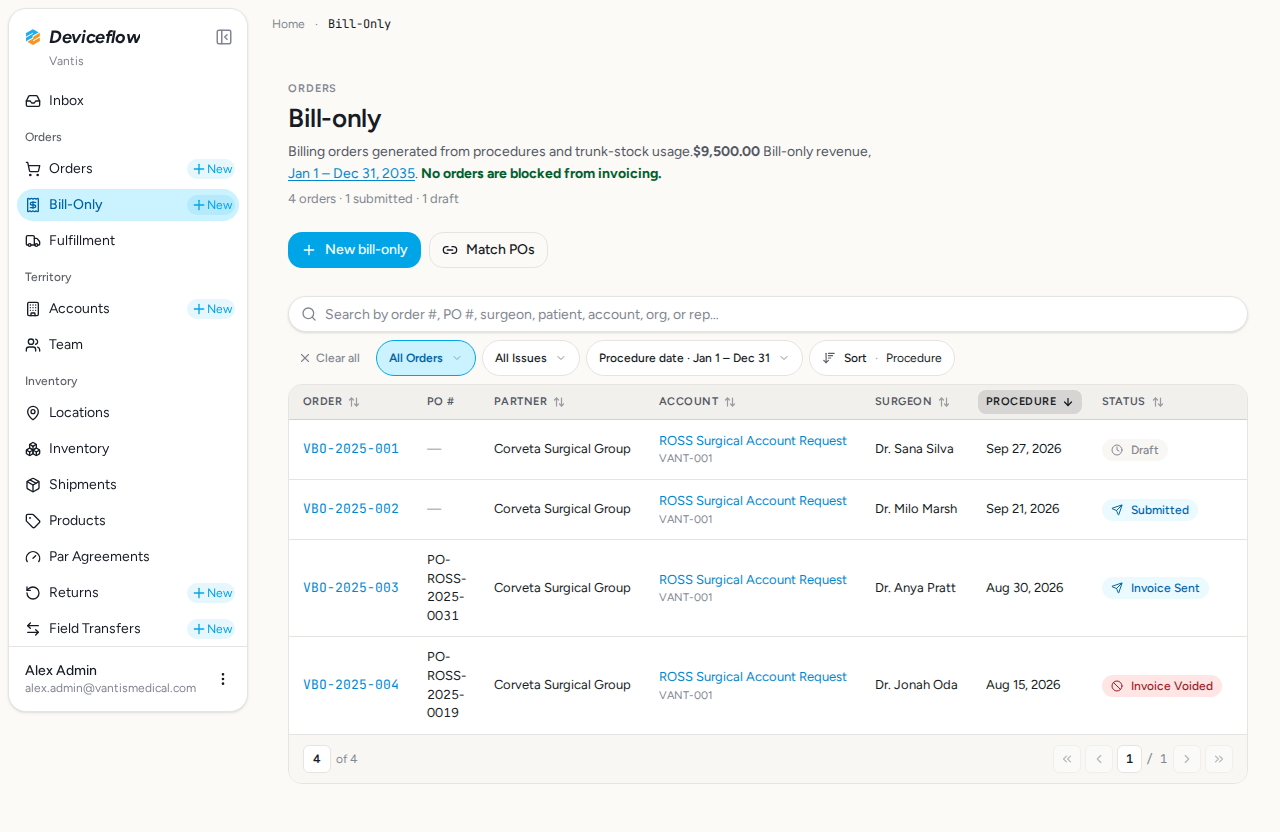
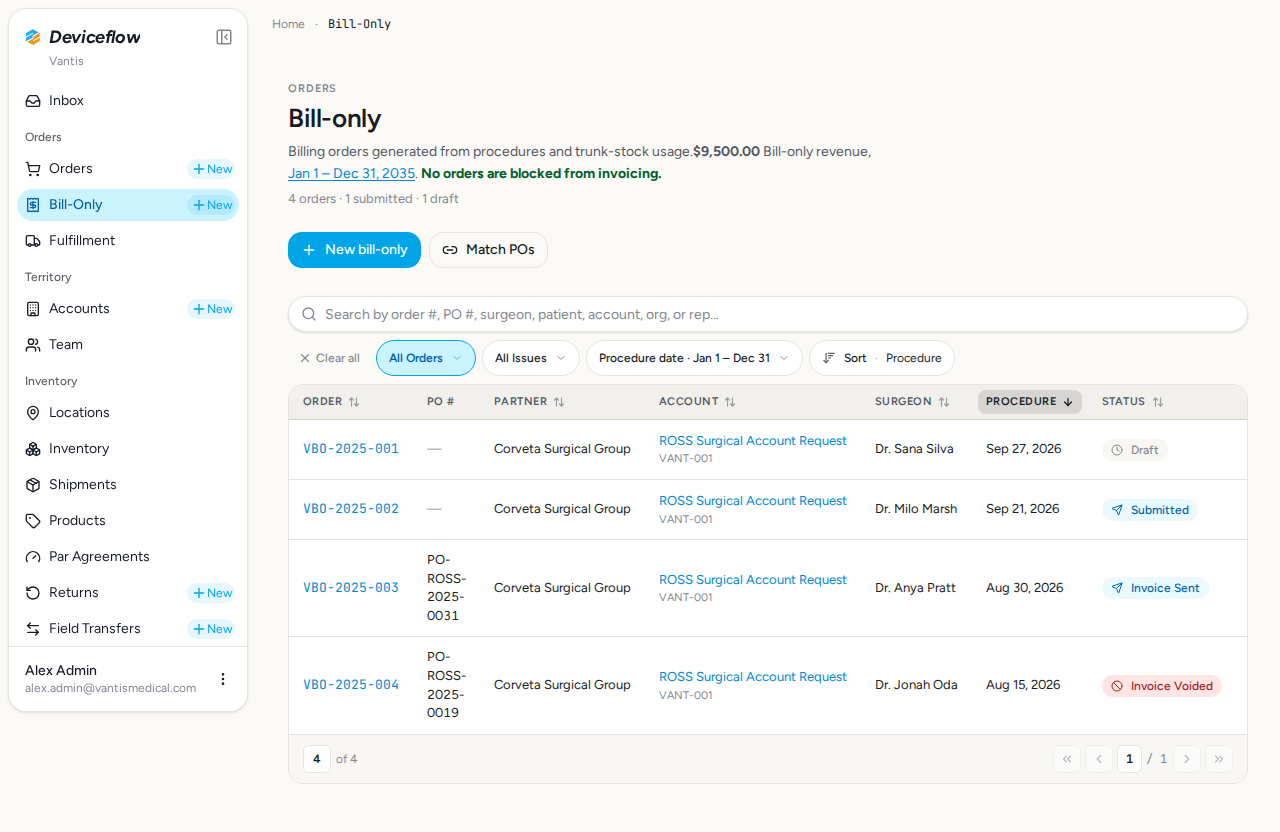
13. Step 8: Status persistence — ✅ PASS
Section titled “13. Step 8: Status persistence — ✅ PASS”What this step proves:
Captures the status badges before and after a navigation-away + hard refresh cycle. Confirms all four badge labels remain unchanged, proving status is persisted in the database and not held only in client-side state.
Screenshots:
Video recording:
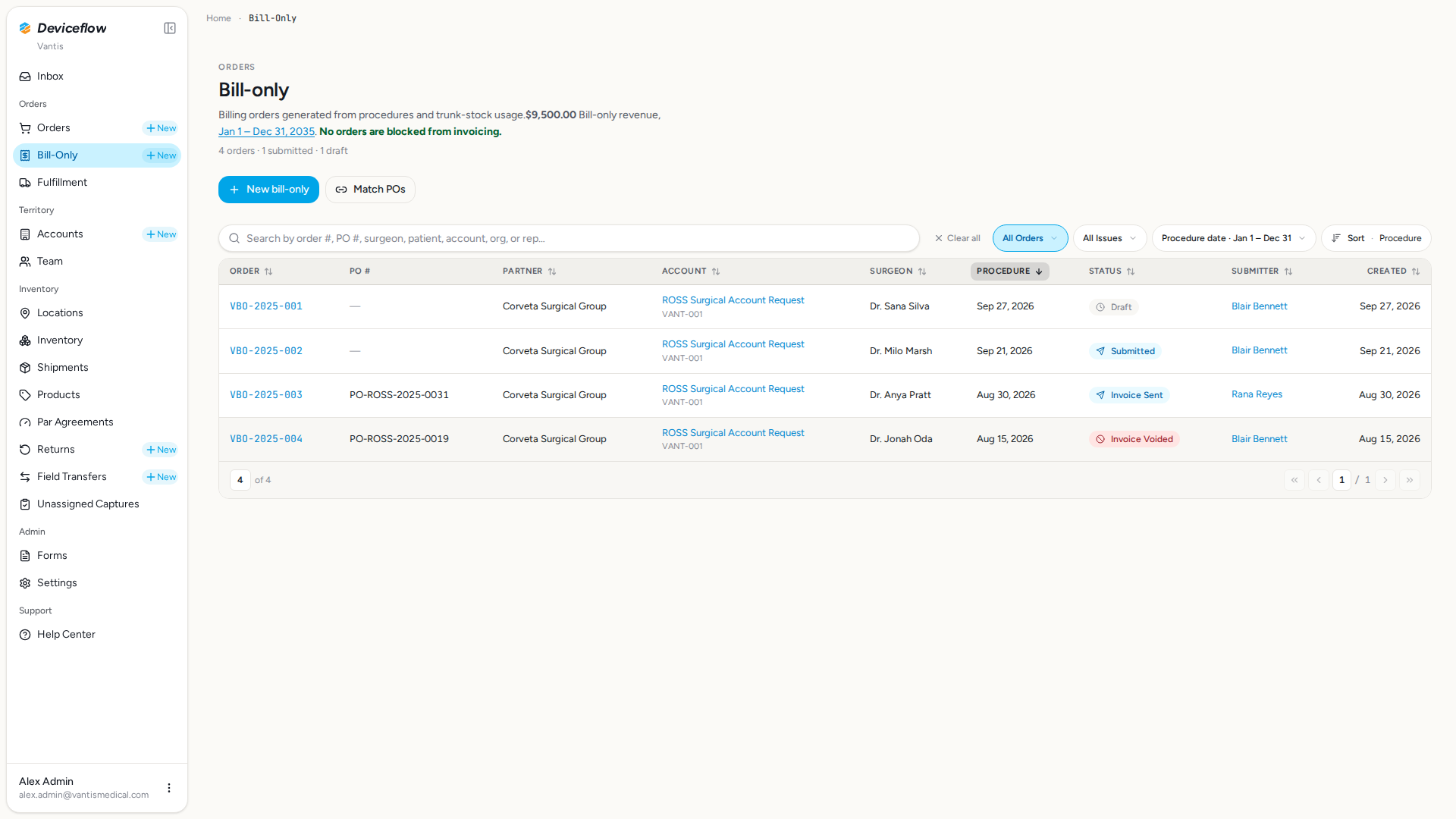
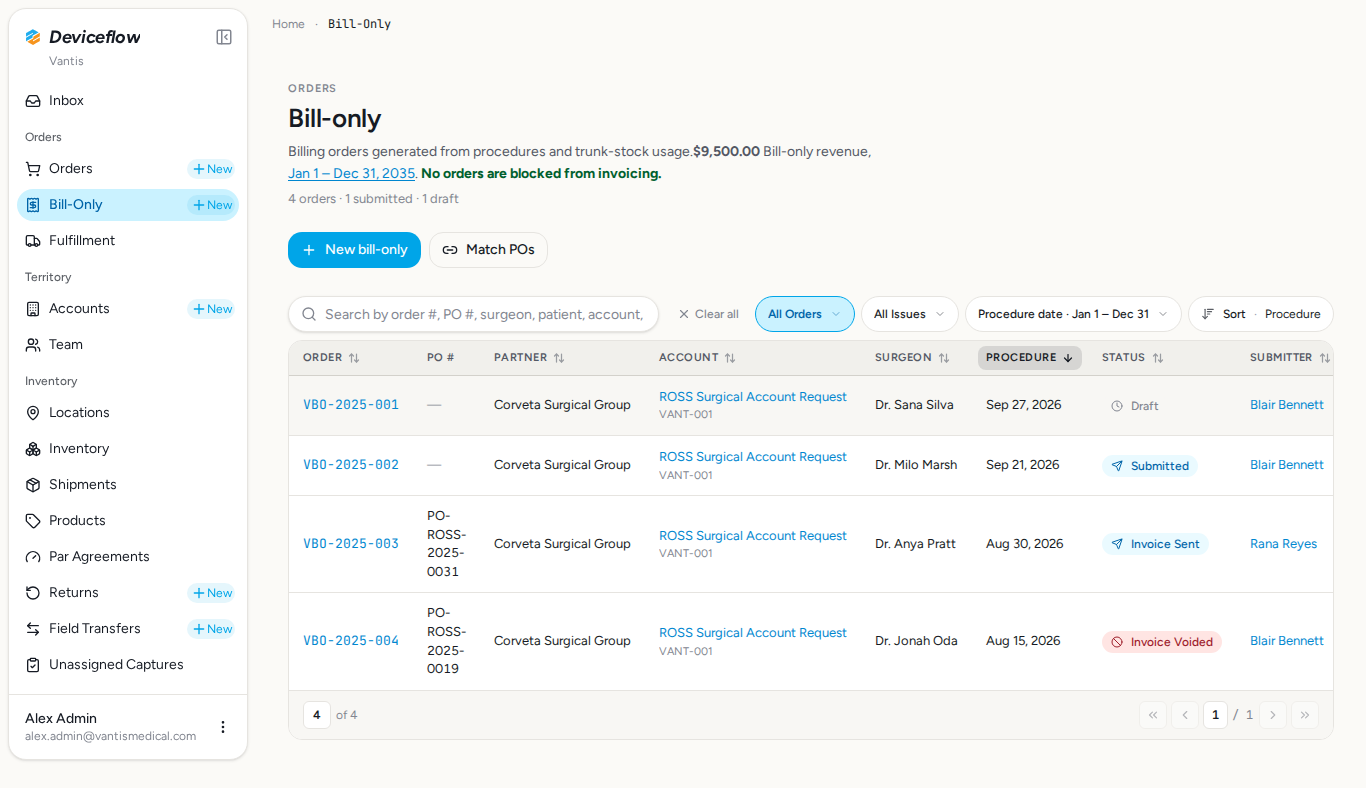
14. Step 9: Responsive layout — ✅ PASS
Section titled “14. Step 9: Responsive layout — ✅ PASS”What this step proves:
Verifies the Status column and badge labels remain visible across two desktop viewport sizes: 1920×1080 (wide) and 1366×768 (narrow). Confirms the column is not hidden or truncated at common desktop resolutions.
Audit events generated by this step:
(Evidence scoped to step execution window: 2026-09-29T02:32:36.987Z → 2026-09-29T02:32:41.379Z)
| Time | Type | Action | User | Org | Performed |
|---|---|---|---|---|---|
| 2026-09-29 02:32:38Z | user_log | user:login | alex.admin@vantismedical.com | Vantis | — |
Screenshots:
Video recording:
Database Validations
Section titled “Database Validations”The following SQL queries ran against the application database after the Playwright scenarios completed. Each query asserts a specific condition that proves the feature under test persisted its data correctly.
All four seeded Bill-Only Orders have the expected status enum values — ✅ PASS
Section titled “All four seeded Bill-Only Orders have the expected status enum values — ✅ PASS”Assertion: VBO-2025-001..004 must exist with statuses VBO-2025-001=draft, VBO-2025-002=submitted, VBO-2025-003=invoice_sent, VBO-2025-004=invoice_voided
SELECT order_number, status, manufacturer_organization_id FROM billing_orders WHERE order_number = ANY($1) ORDER BY order_number| order_number | status | manufacturer_organization_id |
|---|---|---|
| VBO-2025-001 | draft | a1b2c3d4-e5f6-7890-abcd-ef1234567890 |
| VBO-2025-002 | submitted | a1b2c3d4-e5f6-7890-abcd-ef1234567890 |
| VBO-2025-003 | invoice_sent | a1b2c3d4-e5f6-7890-abcd-ef1234567890 |
| VBO-2025-004 | invoice_voided | a1b2c3d4-e5f6-7890-abcd-ef1234567890 |
All four BOs belong to the Vantis manufacturer organization — ✅ PASS
Section titled “All four BOs belong to the Vantis manufacturer organization — ✅ PASS”Assertion: All 4 BOs should be owned by Vantis
SELECT manufacturer_organization_id, count(*)::int AS bo_count FROM billing_orders WHERE order_number = ANY($1) GROUP BY manufacturer_organization_id| manufacturer_organization_id | bo_count |
|---|---|
| a1b2c3d4-e5f6-7890-abcd-ef1234567890 | 4 |
Seeded BOs span four distinct status values — ✅ PASS
Section titled “Seeded BOs span four distinct status values — ✅ PASS”Assertion: Four seeded BOs should have 4 distinct status values
SELECT DISTINCT status FROM billing_orders WHERE order_number = ANY($1) ORDER BY status| status |
|---|
| draft |
| invoice_sent |
| invoice_voided |
| submitted |
Audit Log Events
Section titled “Audit Log Events”Every row written to audit_events while this test was running (scoped to the demo organizations). Provides compliance evidence that user actions are traced end-to-end (URS-003).
Capture window start: 2026-09-29T02:30:47.822Z
SELECT ae.created_at, ae.event_type, ae.action, ae.user_id, u.email AS user_email, ae.organization_id, o.name AS organization_name, ae.object_id, ae.secondary_object_id, ae.payload, ae.route, ae.trace_id FROM audit_events ae LEFT JOIN users u ON u.id = ae.user_id LEFT JOIN organizations o ON o.id = ae.organization_id WHERE ae.created_at >= $1 AND ae.organization_id = ANY($2::uuid[]) ORDER BY ae.created_at ASC10 event(s) captured:
| Time | Type | Action | User | Org | Object ID | Performed | Reason |
|---|---|---|---|---|---|---|---|
| 2026-09-29 02:30:54Z | user_log | user:login | alex.admin@vantismedical.com | Vantis | — | — | |
| 2026-09-29 02:31:02Z | user_log | user:login | alex.admin@vantismedical.com | Vantis | — | — | |
| 2026-09-29 02:31:09Z | user_log | user:login | alex.admin@vantismedical.com | Vantis | — | — | |
| 2026-09-29 02:31:22Z | user_log | user:login | alex.admin@vantismedical.com | Vantis | — | — | |
| 2026-09-29 02:31:29Z | user_log | user:login | alex.admin@vantismedical.com | Vantis | — | — | |
| 2026-09-29 02:31:39Z | user_log | user:login | alex.admin@vantismedical.com | Vantis | — | — | |
| 2026-09-29 02:32:18Z | user_log | user:login | alex.admin@vantismedical.com | Vantis | — | — | |
| 2026-09-29 02:32:24Z | user_log | user:login | alex.admin@vantismedical.com | Vantis | — | — | |
| 2026-09-29 02:32:34Z | user_log | user:login | alex.admin@vantismedical.com | Vantis | — | — | |
| 2026-09-29 02:32:38Z | user_log | user:login | alex.admin@vantismedical.com | Vantis | — | — |
Additional Video Evidence
Section titled “Additional Video Evidence”The following screencast recordings were captured but could not be matched to a specific test step. Step-matched recordings appear inline in their respective step sections above.